

What this is for
Settings → Integrations is the catalog of third-party connections for your organization. Each integration is a card on a searchable hub; clicking View integration opens a two-step dialog — Overview (what the connector does) and Connect (credentials and Test & Connect). Available today:- GitHub — AI-dependency discovery for Discovery.
- Azure AI Foundry and Amazon Bedrock — cloud agent inventory for Agents and Topology.
- Microsoft Entra ID — identity hydration and expanded ASI03 findings on agents (no separate agent list).
Integrations are platform-scoped — configure once per organization, not per gateway.
The integrations hub
Search and filters
Card states
Each card shows the integration name, one-line tagline, and View integration.
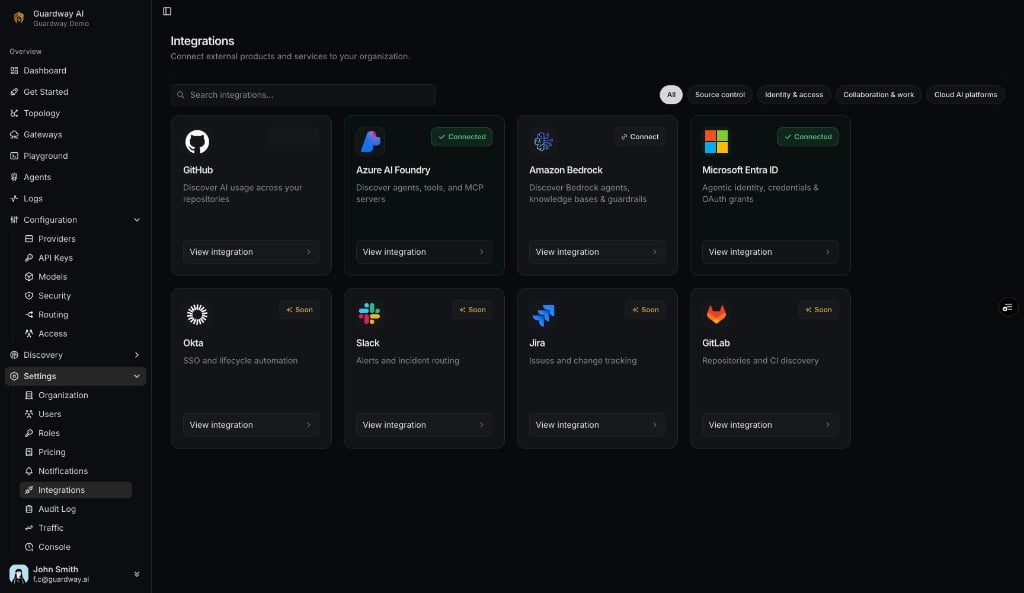
Settings → Integrations hub
Integration dialog
Every View integration opens the same dialog shell:
Deep links: opening
?open=<slug> on the integrations route selects the card automatically (azure-foundry, aws-bedrock, entra-id, github).
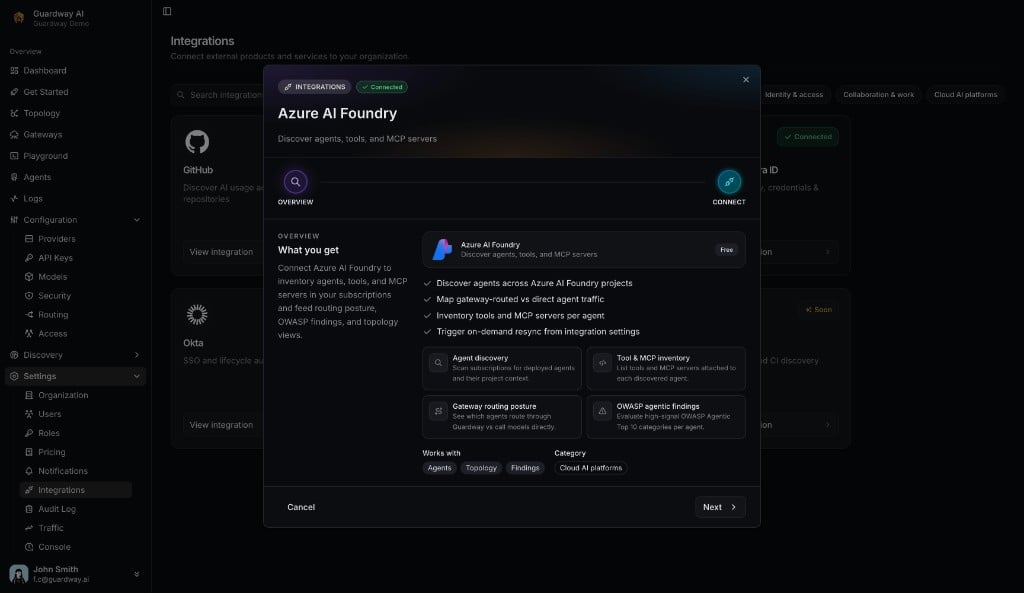
Integration dialog — Overview step (Azure AI Foundry)
GitHub
Connection state
Limits
- One GitHub PAT per organization.
- Used for Discovery only — no per-repo routing.
How to configure (GitHub)
1
Open the GitHub card
Settings → Integrations → GitHub → View integration → Next to Connect.
2
Create a PAT
On github.com/settings/tokens, create a classic token with
repo and read:org.3
Test & Connect
Paste the PAT and click Test & Connect. The hub card shows Connected.
4
Verify in Discovery
Open Discovery → Repositories.
Azure AI Foundry
Read-only Service Principal — lists agents, tools, MCP servers, and models.
Connection state
Limits
- One Azure subscription per organization in v1.
- Data-plane role required at AI Services account scope (see permissions below).
How to configure (Azure AI Foundry)

Azure AI Foundry — Connect step
1
Register a Service Principal
App registrations → New registration (single tenant, no redirect URI). Copy Application (client) ID.
2
Create a client secret
Certificates & secrets → copy the secret Value immediately.
3
Grant subscription Reader
Subscriptions → IAM → Reader (or Azure AI Developer) for the SP.
4
Grant account-scoped data-plane access
On each AI Services account → IAM → Azure AI User or Azure AI Developer for the SP. Subscription-level alone returns
401 on agent APIs.5
Connect in Guardway
View integration → Connect → paste four fields → Test & Connect.
6
Verify agents
Open Agents or Dashboard → Agents. Use Resync after adding projects.
Required Azure permissions
Microsoft Entra ID
Connection state
Required Microsoft Graph permissions
Limits
- One tenant (same as Foundry SP).
- Identity sync chains after Foundry Resync — no separate Entra Resync button yet.
How to configure (Microsoft Entra ID)

Microsoft Entra ID — Connect step
1
Connect Azure AI Foundry first
Entra reuses that Service Principal.
2
Grant Graph admin consent
App registrations → your SP → API permissions → add the three Graph application permissions → Grant admin consent.
3
Test Microsoft Graph access
On the Entra Connect step, click Test Microsoft Graph access until both required scopes show Granted and status is Active.
4
Resync Foundry
Azure AI Foundry → Resync chains identity sync. Open an agent detail page to see Identities.
Amazon Bedrock
Read-only — lists Bedrock Agents, action groups, knowledge bases, models, and referenced guardrails.
Connection state
Limits
- One AWS account + region per organization in v1.
- No MCP servers on Bedrock agents (MCP column stays empty).
- Guardrails referenced by agents appear as metadata only.
Required AWS IAM permissions
AWS managed
AmazonBedrockReadOnly plus sts:GetCallerIdentity (or ReadOnlyAccess).
How to configure (Amazon Bedrock)

Amazon Bedrock — Connect step
1
Create an IAM user
Programmatic access only (e.g.
guardway-cloud-agent-discovery).2
Attach policies
AmazonBedrockReadOnly and inline sts:GetCallerIdentity on *.3
Create access key
Copy Access key ID and Secret access key (secret shown once).
4
Connect in Guardway
View integration → Connect → paste three fields → Test & Connect.
5
Verify agents
Open Agents. Use Resync after adding agents in AWS.
Coming soon
Hub cards marked Soon: Okta, Slack, Jira, GitLab. Email support@guardway.ai to prioritize one.Related
- Agents — inventory and findings.
- Dashboard → Agents — org-wide agent metrics.
- Topology — gateway → provider → model → agent graph.
- Discovery — GitHub-powered repository scans.