

What this is for
The Audit Log is a tamper-evident record of every administrative action across your organization — config changes, key rotations, user invites, provider edits, failed auth, role changes, and so on. Use it to investigate incidents, satisfy compliance reviews, and verify that an action you took (or that someone reported) actually happened.Audit logs live on the Guardway platform, not on individual gateways. Every administrative action — whether it touched the org, a gateway, or a configuration entity — is recorded centrally so you have one consolidated trail for the whole organization.
Options
Columns
Columns are sortable and resizable.
Filters
- Free-text search — debounced, matches any field, server-side.
- Who — actor dropdown.
- Action —
All Actions,Read,Create,Update,Delete. - Target — resource type.
- Time range —
All Time,Last Hour,24h,7d,30d, or a custom calendar. - Refresh — manual refetch.
Event categories
Actions are bucketed by the verb in the event name:Row actions
- Expand — pretty-printed JSON with every field broken out.
- Raw / Details toggle — switch between structured view and raw payload.
- Copy event — copies the full JSON to the clipboard.
How to configure
There is no configuration on this page — the audit log is read-only and recorded automatically by the platform. To filter or investigate: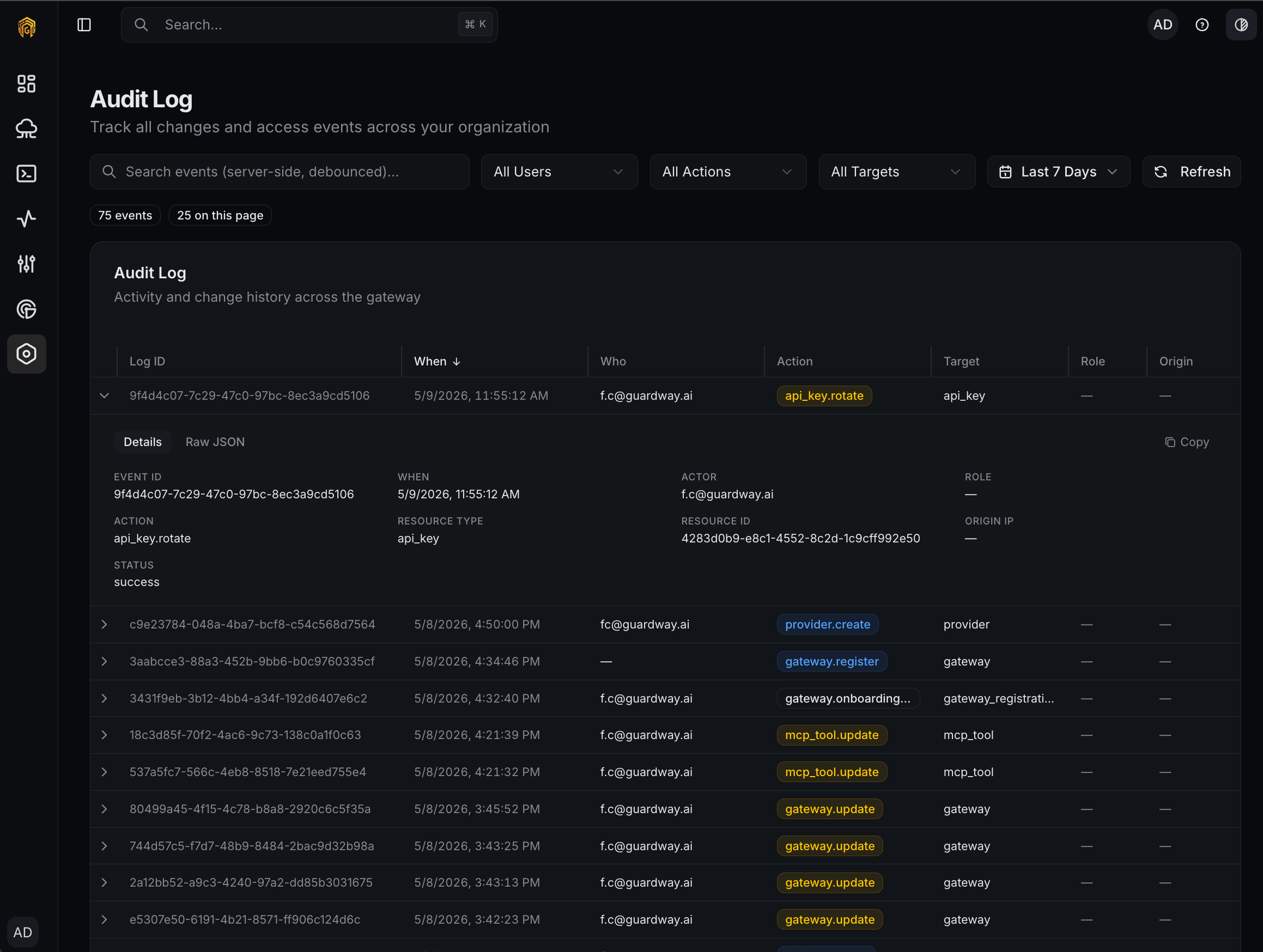
Settings → Audit Log
1
Open Settings → Audit Log
Open Settings → Audit Log from the dashboard sidebar. The most recent events appear at the top.
2
Narrow the time range
Pick a preset (
Last Hour, 24h, 7d, 30d) or open the custom calendar to pin a specific window.3
Filter by actor or action
Use Who to focus on a single user, or Action to pull only delete / update / create / read events.
4
Inspect a single event
Click a row to expand it. Use Raw / Details to flip between structured fields and the raw JSON; Copy event copies the full payload for pasting into a ticket.
Permissions
Any signed-in member of the organization can read the audit log. Role-based restrictions on the audit log itself are not applied in the UI; the action badge shows the actor’s role at the time of each event for attribution.Related
- Logs — request, MCP, guardrail, and trace logs (operational, not administrative).
- Privacy & Security — how audit data is stored and protected on the platform.