

What this is for
AI Supply Chain → Inventory → Agents (/supply-chain/inventory?tab=agents) lists every AI agent Guardway has found:
- On your endpoints, from the Guardway endpoint agent: agent definition files an AI tool loads (for example
~/.claude/agents/*.md), and code whose dependencies include an agent framework or a model SDK. - In your cloud accounts, from the cloud connectors: Azure AI Foundry and Amazon Bedrock agents, with their models, tools, MCP servers, gateway routing, linked Entra ID identities and OWASP Top 10 for Agentic Applications findings.
Endpoint agents appear once the endpoint agent reports. Cloud agents need at least one cloud AI integration under Settings → Integrations and a first completed sync.
Connectors
Origin tells endpoint rows from cloud rows. Azure AI Foundry and Amazon Bedrock each discover agents for their cloud; an org with several accounts or subscriptions of one provider sees each row named with the connection that found it.
Microsoft Entra ID does not add agents. It hydrates each discovered cloud agent with execution identity (Service Principal or Managed Identity), owners, credential lifecycle, OAuth grants and directory roles for ASI03 rules. Identity sync runs after a successful Resync on the Azure AI Foundry card (or after Test Microsoft Graph access on the Entra card).
The Azure AI Foundry connector discovers both prompt agents (default in the New Foundry experience) and legacy Assistants-API agents.
Inventory
Definitions scanned
A line under the Agents heading names the AI tools whose agent definition folders the sensors walk, for example: “Agent definitions scanned for Claude Code. Other AI tools’ definitions are not reported.” An agent defined for a tool that is not named there is not missing, it is not reported. When some machines walk more tools than others, the line says on how many (for example “Kiro and OpenCode on 1 of 7 machines”), and the info button lists the folders walked for each tool. With a machine picked, the line describes that machine’s sensor. Sensors that do not report their folders walk~/.claude/agents, and .claude/agents inside a project except on Windows. Agents provided by Claude Code plugins are not walked.
Filters
Columns
Likely to run
The note beside each rung says what the reading rests on: how the harness was found (installed, an enabled extension, only its config directory, or installed but disabled in an editor profile) and whether it is signed in; a cloud agent’s gateway routing and status. A gateway route is configuration, not observed traffic, so it never lifts a cloud agent above Deployed. Instruction files (rules, steering, guidelines,
AGENTS.md) are not agents: they are listed under Add-ons.
For agent code, the note begins with where the code sits: “Checkout of a repository” or “Checkout; no remote reported” in a checkout the endpoint agent reported, and in a folder “No git checkout found” when that machine’s endpoint agent reports checkouts, or “Folder; no checkout reported” when it does not. Code in a Claude Code plugin copy, and a definition the endpoint agent reports as one, is Local code and reads “Plugin marketplace copy; whether the plugin is enabled is not reported” or “Plugin cache; whether the plugin is enabled is not reported”.
Agent evidence
How Guardway knows a row is an agent. A dependency is not an agent, so each class says what was found and nothing more.
When the endpoint agent matches an MCP server configured in an AI tool to one of these code folders, by the server’s command, arguments or working directory, the server’s sheet on the MCP tab shows that folder as Source folder. When machines matched the server to different folders, all of them are listed, and none is offered to copy. When the folder’s only marker is the MCP server SDK, the code is listed only there, as that MCP server, and not here as an agent; with any other marker it is listed in both places. An endpoint agent that does not report the match lists the code here, so the Agents count can drop when a machine’s endpoint agent is updated.
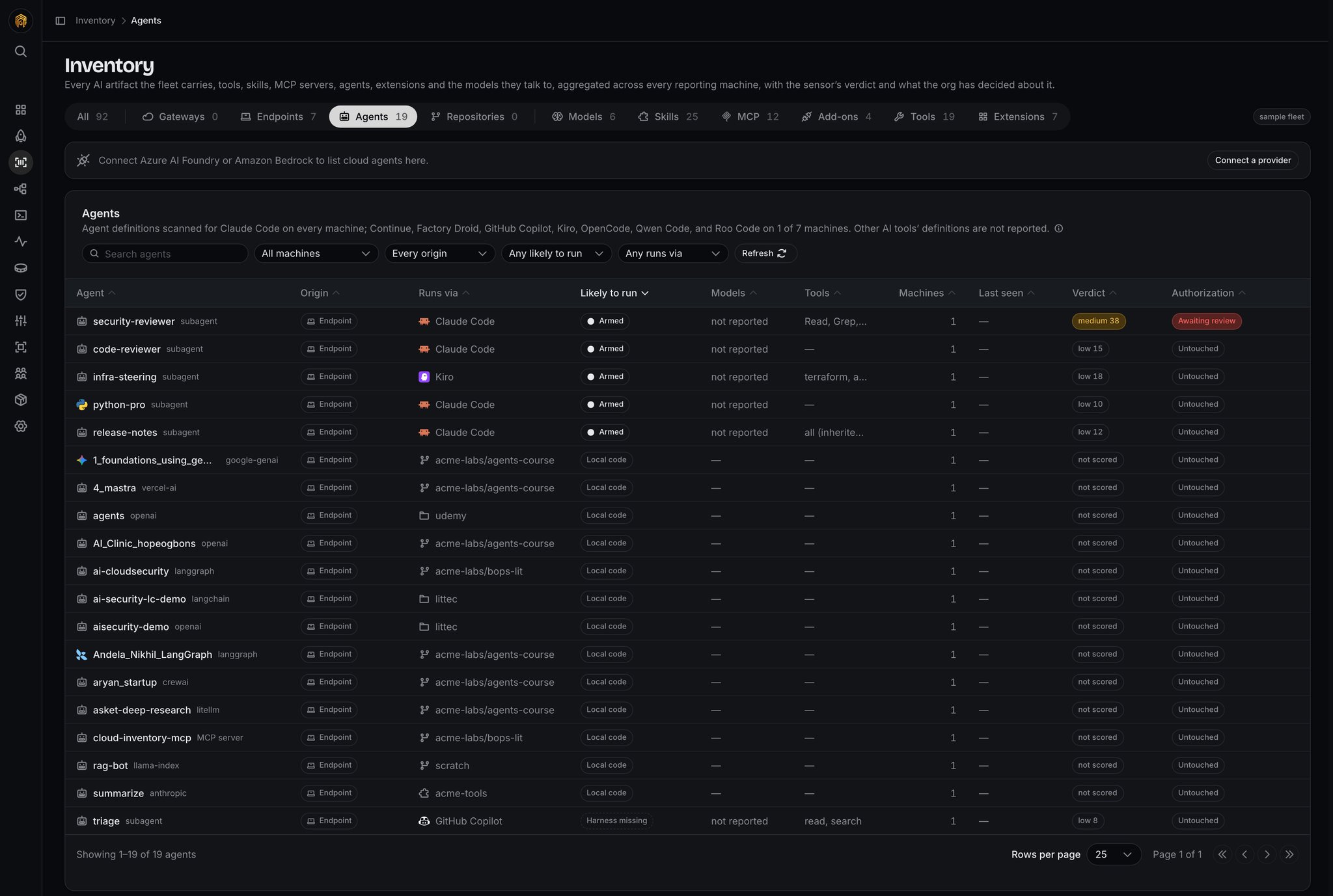
Inventory → Agents
Findings
Open Findings from the Agents tab (/supply-chain/inventory?tab=agents&view=findings) for the org-wide OWASP list of cloud agents.
Toolbar
Columns
Sorted by severity (highest first), then category, then rule id.
Empty state: No OWASP findings detected. with a green shield icon.
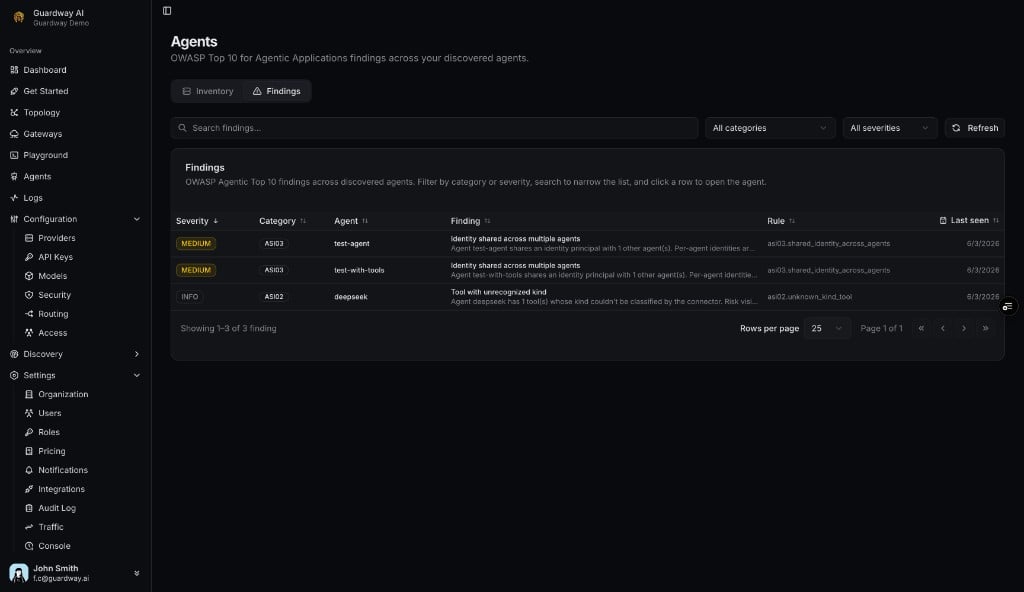
Agents → Findings
Agent detail
Opens as a sheet when you click a row; previous / next step through the rows in their current order.Endpoint agents
Cloud agents: header
Agent name, provider · project · account label, Routing unknown / gateway badge, an optional worst-severity chip andN ASI finding(s) anchor to the findings card, and Open in console when raw_url is present.
Cloud agents: sections (in order)
Footer: last discovered timestamp.
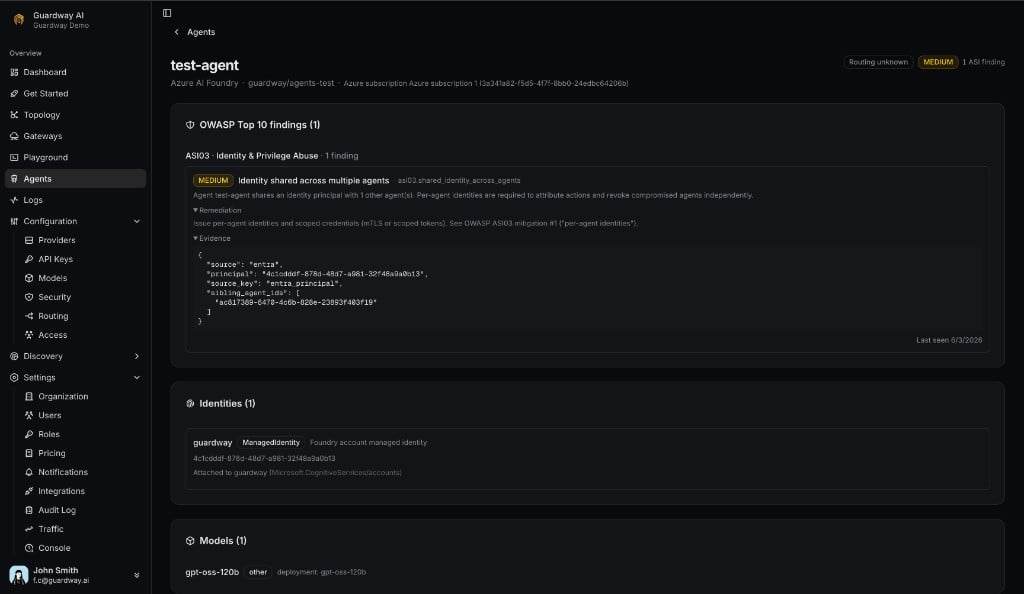
Agent detail
OWASP Top 10 categories
Guardway maps findings to the OWASP Top 10 for Agentic Applications 2026 framework. Five categories are evaluated in this release from passive cloud metadata; the rest are deferred (Limits).Rule reference
ASI02 · Tool Misuse & Exploitation
ASI02 · Tool Misuse & Exploitation
ASI03 · Identity & Privilege Abuse
ASI03 · Identity & Privilege Abuse
Rules below
no_managed_identity_hint require Microsoft Entra ID and a resolved agent → principal link.ASI04 · Agentic Supply Chain Vulnerabilities
ASI04 · Agentic Supply Chain Vulnerabilities
ASI05 · Unexpected Code Execution (RCE)
ASI05 · Unexpected Code Execution (RCE)
ASI07 · Insecure Inter-Agent Communication
ASI07 · Insecure Inter-Agent Communication
Severity meanings
Lifecycle
Findings are created on first rule match, updated on each sync when the rule still fires, and pruned automatically when the rule stops firing. Deleting an agent in the provider removes its findings.Gateway routing detection
Hostname of the model endpoint is compared to registered gateway URLs.Limits
- Endpoint agent definitions are reported only from the folders named under the Agents heading (see Definitions scanned).
- One subscription (Azure) or account+region (Bedrock) per provider per organization in v1.
- Refresh is on-demand via integration Resync; no continuous background poll yet.
- OWASP evaluation is passive — Guardway never sends prompts to discovered agents.
- Five ASI categories evaluated (ASI02, ASI03, ASI04, ASI05, ASI07).
- ASI04 allowlist: until seeded, MCP hosts may all trigger
asi04.mcp_server_unpinned_url.
Related
- Dashboard → Agents — org-wide metrics and breakdowns.
- Topology — graph of gateways → providers → models → agents.
- Settings → Integrations — connect providers.
- Logs — request history for gateway-routed traffic.