

gw-cli) is the endpoint-side arm of Discovery. Where the GitHub side of Discovery scans your repositories in the cloud, gw-cli runs on a machine — a developer laptop, a build host, a workstation — and inventories the AI tools that are actually installed there: the agents, accounts, agent projects, skills, MCP servers, and extensions a person has on disk, each scored for risk.
It is a single self-contained binary. It runs entirely on the machine and stores its results encrypted under ~/.guardway. By default it is local-only — nothing leaves the endpoint. Optionally, you can enroll it with a console API key so it reports its inventory to a central Guardway console for fleet visibility; reporting is strictly opt-in (see Fleet reporting).
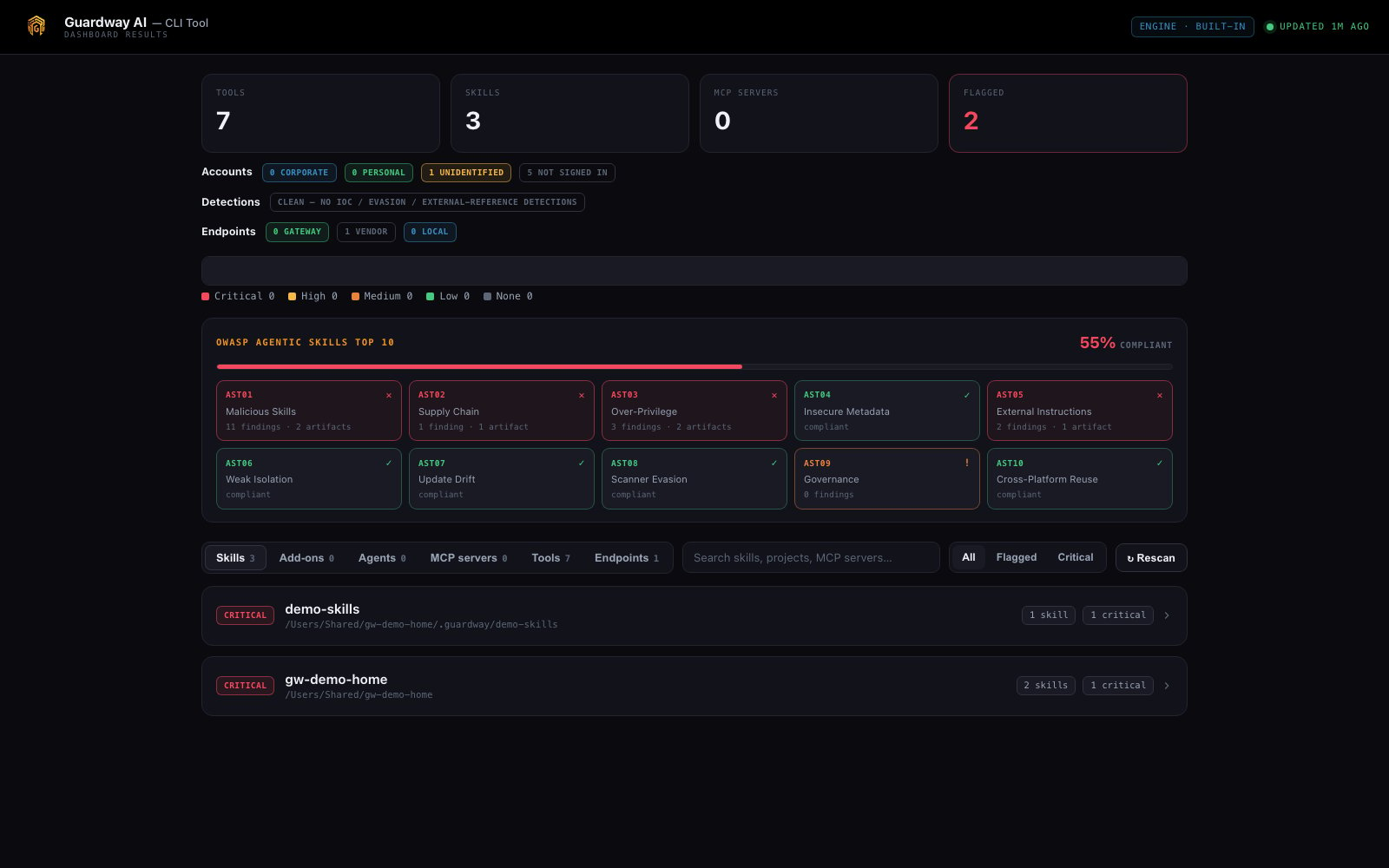
Guardway CLI → local dashboard
What this is for
Repository Discovery answers “what AI does our source code depend on?” The Guardway CLI answers the complementary question: “what AI tooling is actually installed and running on this endpoint, and is any of it risky?” Use it to:- Inventory the AI tools, agent projects, skills, MCP servers, and extensions on a machine.
- Risk-score each skill / command / subagent / MCP config before it can do harm.
- Measure the machine against the OWASP Agentic Skills Top 10 — every finding is tagged AST01–AST10 and rolled up into a compliance score.
- Govern what’s installed:
approvea reviewed baseline, then get flagged when anything new or changed appears. - Vet a skill or repo from a git URL before installing it — clone-and-scan, never execute.
- Watch live LLM traffic (model, redacted prompt, tool calls, tokens, destination) on macOS.
What it finds
Platforms
Install
- macOS
- Linux
- Windows
gw-cli to ~/.local/bin and clears the download-quarantine flag. If gw-cli: command not found, add ~/.local/bin to your PATH:The current builds are unsigned test builds. On macOS, if Gatekeeper blocks it, run
xattr -dr com.apple.quarantine ~/.local/bin/gw-cli. On Windows, SmartScreen/Defender may warn on first run; install.ps1 clears the mark-of-the-web.How it works
1
Inventory the machine
~/.guardway.2
View the results
3
Keep it current (recommended)
--user timer / Task Scheduler) that re-runs discover --deep on a cadence and exits — nothing stays resident. Open serve whenever you want to look.4
Vet before you install
5
(macOS) Capture live traffic
Accurate risk scoring (recommended)
Out of the box,gw-cli scores with a built-in heuristic engine. For production-grade precision, install NVIDIA SkillSpector with one guided command — it discloses what it is and what leaves the machine, asks before installing, and pins to a reviewed commit:
gw-cli accept marks it trusted so it stops counting against OWASP compliance.
See Inventory & Risk Scoring for how the two engines differ and what the offline augmentation passes add on top.
Fleet reporting (optional)
By default the CLI never talks to the network. To roll endpoint inventory up into a central console for fleet visibility, enroll the machine once with an endpoint API key:<data-dir>/config.toml (mode 0600, never logged). Afterwards you can push the current snapshot on demand or after a scan:
Reporting is opt-in and fail-safe: nothing is sent unless a key + URL are configured, secrets are already redacted at source,
--air-gap disables reporting, and a failed push is queued to a local outbox and retried on the next run — it never breaks a scan.Scope & privacy
The Guardway CLI is local-first. It runs on the machine and stores everything encrypted under~/.guardway (%USERPROFILE%\.guardway on Windows). Unless you explicitly enroll it with a console API key, nothing leaves the endpoint — no inventory, no findings, no prompts. Wipe all state with rm -rf ~/.guardway.