> ## Documentation Index
> Fetch the complete documentation index at: https://docs.guardway.ai/llms.txt
> Use this file to discover all available pages before exploring further.
# Topology
> Live graph of gateways, providers, models, and discovered agents — with OWASP severity on agent nodes.
## What this is for
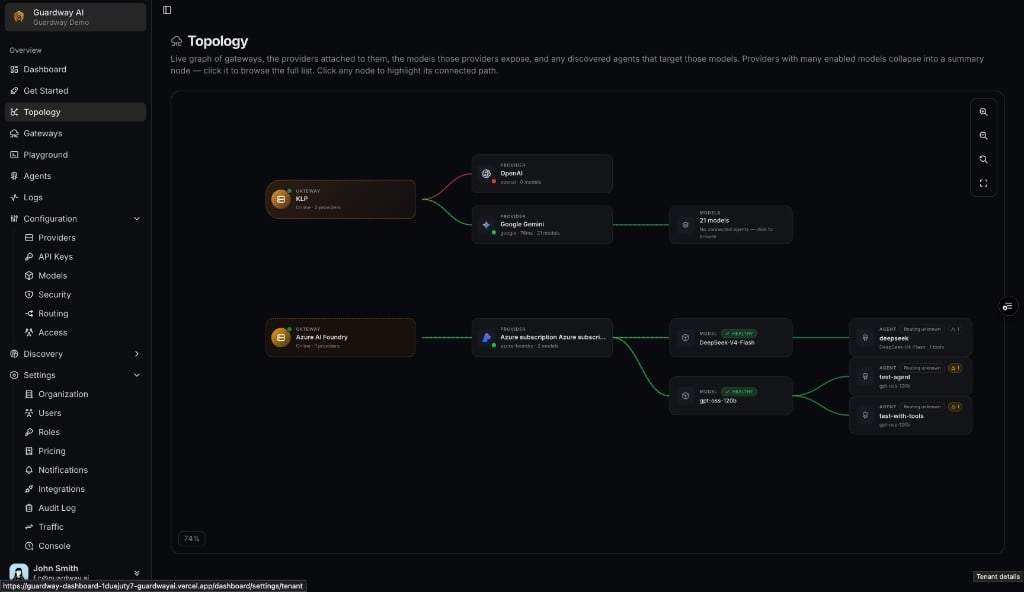
**Topology** is the live graph of how inference traffic flows through your Guardway estate. It connects **Gateways** to the **Providers** attached to them, the **Models** those providers expose, and any **Agents** discovered in your cloud that target those models.
Platform operators and security reviewers use it to see routing posture at a glance — which agents are attached to which models, whether a provider is healthy, and whether an agent node carries open OWASP findings — without opening each agent one by one.
It lives at **Topology** in the dashboard sidebar (between **Get Started** and **Gateways**).
The graph needs at least one registered gateway **or** a connected cloud-agent-discovery integration ([Azure AI Foundry](/platform/settings/integrations#azure-ai-foundry), [Amazon Bedrock](/platform/settings/integrations#amazon-bedrock)) before it renders meaningful nodes.
## Options
### Graph layout
The canvas reads left to right in four columns:
| Column | Node type | Notes |
| ------------- | --------- | -------------------------------------------------------------------------------------------------------------------------------------------------------------------------------- |
| **Gateways** | Gateway | Name, online/offline status, provider count subtitle. Click to highlight connected paths. |
| **Providers** | Provider | Provider name, latency when available, model count. Disabled providers render muted. |
| **Models** | Model | Deployment name, **HEALTHY** / unhealthy badge when the platform reports model health. A rollup node (**N models**) appears when many models share a provider — click to browse. |
| **Agents** | Agent | Discovered agent name, routing badge (`Gateway: `, `Bypassing gateway`, or `Routing unknown`), tool count. Severity chip when the agent has open OWASP findings. |
Edges between columns show how traffic and discovery relationships connect. Color follows node health — for example, a provider with zero models may render a warning-colored path.
### Canvas controls
| Control | Notes |
| ---------------------- | ------------------------------------------------------------------------------ |
| **Zoom in / Zoom out** | Adjust canvas scale. Current zoom percentage shows in the corner (e.g. `74%`). |
| **Fit to screen** | Re-centers the graph in the viewport. |
| **Reset zoom** | Returns to the default scale. |
### Selection and details
Clicking any node opens a **details** sheet on the right with context-specific fields — gateway environment and version, provider latency, model deployment list, or agent routing plus finding count. Clicking empty canvas clears the selection.
Agent nodes link through to the [Agents](/platform/agents) workspace when you need full OWASP remediation text or identity metadata.
## How to configure
There is no configuration on this page — it reflects gateways registered under [Gateways](/guardway-gateway/overview), providers synced from [Configuration → Providers](/platform/configuration/providers), and agents discovered via [Settings → Integrations](/platform/settings/integrations).
 Select **Topology** from the dashboard sidebar.
If the canvas is empty, connect **Azure AI Foundry** or **Amazon Bedrock** under **Settings → Integrations**, and/or register at least one gateway. Wait for the first agent sync or gateway heartbeat.
Pan and zoom the canvas. Click a gateway, provider, model rollup, or agent node to highlight its path and read the details sheet.
From an agent node, open the **Agents** workspace to review findings, identities, and tools in full detail.
## Limits
* The graph synthesizes a **Cloud provider → Account → Model** chain for discovered agents whose model names do not match a provider already attached to a gateway — useful when agents call models your gateways have not registered yet.
* Agent routing badges on topology nodes use the same hostname heuristic as the [Agents](/platform/agents) inventory — endpoints the connector cannot resolve stay **Routing unknown**.
* Topology refreshes on the same cadence as gateway and agent discovery data (roughly once per minute while the tab is visible); it is not a real-time packet trace.
## Related
* [Dashboard → Agents](/platform/dashboard/agents) — org-wide agent metrics and finding breakdowns.
* [Agents](/platform/agents) — per-agent inventory, findings list, and detail view.
* [Gateways](/guardway-gateway/overview) — register gateways so they appear in the first column.
* [Settings → Integrations](/platform/settings/integrations) — connect cloud providers that populate agent nodes.
Select **Topology** from the dashboard sidebar.
If the canvas is empty, connect **Azure AI Foundry** or **Amazon Bedrock** under **Settings → Integrations**, and/or register at least one gateway. Wait for the first agent sync or gateway heartbeat.
Pan and zoom the canvas. Click a gateway, provider, model rollup, or agent node to highlight its path and read the details sheet.
From an agent node, open the **Agents** workspace to review findings, identities, and tools in full detail.
## Limits
* The graph synthesizes a **Cloud provider → Account → Model** chain for discovered agents whose model names do not match a provider already attached to a gateway — useful when agents call models your gateways have not registered yet.
* Agent routing badges on topology nodes use the same hostname heuristic as the [Agents](/platform/agents) inventory — endpoints the connector cannot resolve stay **Routing unknown**.
* Topology refreshes on the same cadence as gateway and agent discovery data (roughly once per minute while the tab is visible); it is not a real-time packet trace.
## Related
* [Dashboard → Agents](/platform/dashboard/agents) — org-wide agent metrics and finding breakdowns.
* [Agents](/platform/agents) — per-agent inventory, findings list, and detail view.
* [Gateways](/guardway-gateway/overview) — register gateways so they appear in the first column.
* [Settings → Integrations](/platform/settings/integrations) — connect cloud providers that populate agent nodes.