> ## Documentation Index
> Fetch the complete documentation index at: https://docs.guardway.ai/llms.txt
> Use this file to discover all available pages before exploring further.
# Organization
> Tenant-level facts about your Guardway organization — display name, slug, tenant ID, and quick links to people and gateways.
## What this is for
**Settings → Organization** is the tenant overview page. It shows who you are inside Guardway: the org's display name, slug, tenant ID, when it was created, your role, and a count of people and gateways under it.
Every Guardway account belongs to exactly one **organization**. Your org is created automatically on sign-up and you become its first **Owner**. All gateways, providers, models, keys, and usage roll up to this org.
## Options
### Stat blocks
| Block | What you see |
| --------------- | -------------------------------------------------------------------------------------------------------------- |
| **People** | Active members and pending invites. Link: **Manage members** → [Settings → Users](/platform/settings/members). |
| **Gateways** | Count of registered gateways for this tenant. Link: **View gateways** opens the **Gateways** page. |
| **Your access** | Your role in this org (`Owner`, `Admin`, or `Read Only`). |
### Organization details
| Field | Notes |
| ---------------- | ------------------------------------- |
| **Display name** | Human-readable org name. |
| **Slug** | URL-safe identifier shown as a badge. |
| **Tenant ID** | UUID used by the platform internally. |
| **Created** | When the org was created. |
These fields are read-only on this page. To rename the org or change billing details, contact support.
## How to configure
This page is read-only. Use it as the jump-off into the surfaces that *are* configurable:
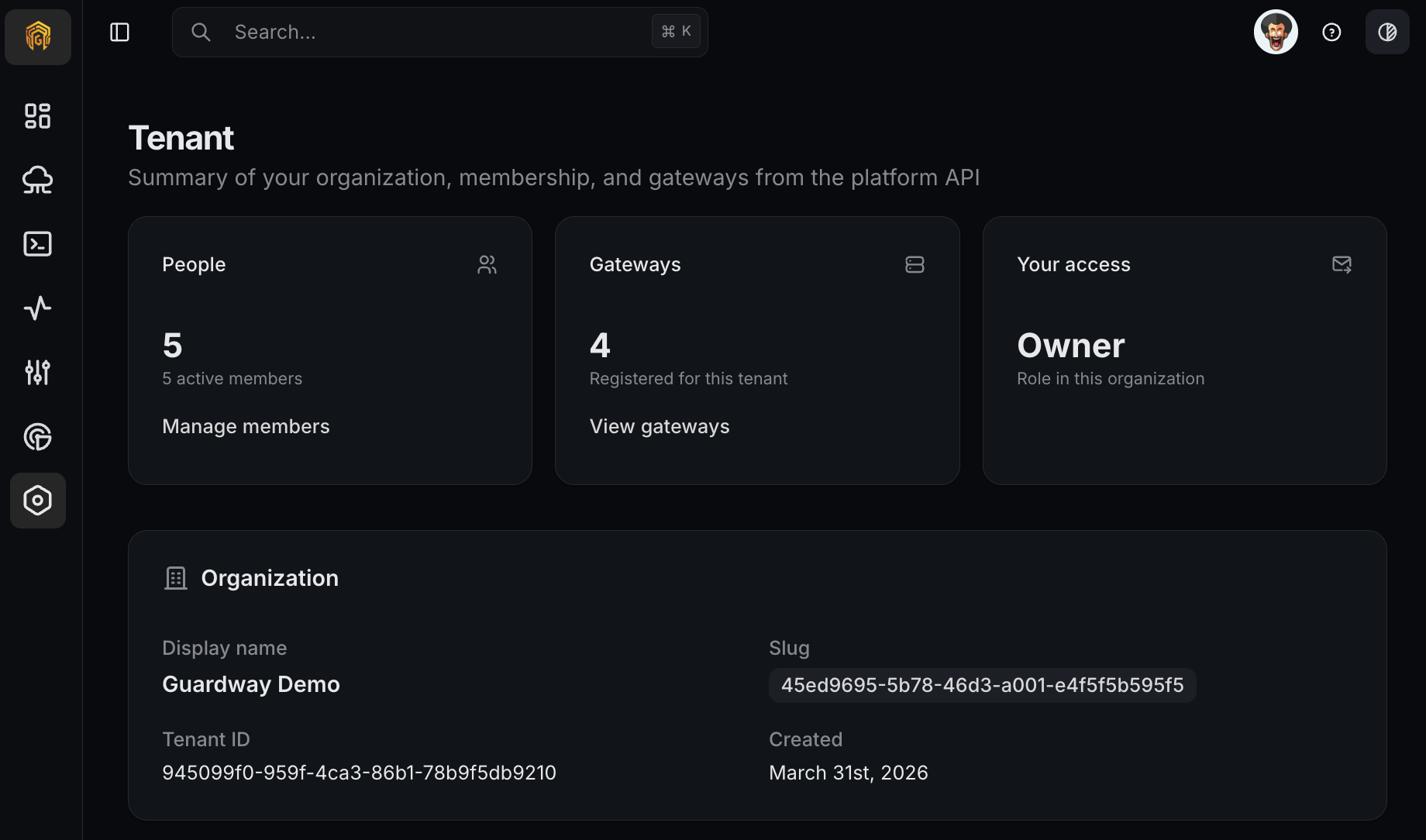 Open **Settings → Organization** from the dashboard sidebar.
Verify the display name and slug match the org you intend to operate on. The tenant ID is what you'd quote when filing a support ticket.
Click **Manage members** to invite teammates, or **View gateways** to register or inspect gateways.
## Related
* [Members](/platform/settings/members) — invite and remove people, change roles.
* [Roles](/platform/settings/roles) — what each role can do.
* [Pricing](/platform/settings/pricing) — per-model cost table used by Spend.
Open **Settings → Organization** from the dashboard sidebar.
Verify the display name and slug match the org you intend to operate on. The tenant ID is what you'd quote when filing a support ticket.
Click **Manage members** to invite teammates, or **View gateways** to register or inspect gateways.
## Related
* [Members](/platform/settings/members) — invite and remove people, change roles.
* [Roles](/platform/settings/roles) — what each role can do.
* [Pricing](/platform/settings/pricing) — per-model cost table used by Spend.