> ## Documentation Index
> Fetch the complete documentation index at: https://docs.guardway.ai/llms.txt
> Use this file to discover all available pages before exploring further.
# Users
> Invite teammates to your Guardway organization, change their roles, and revoke access.
## What this is for
**Settings → Users** controls who can sign in to your Guardway organization and what they can do once they're in. Use it to onboard teammates, change roles, send password resets, or revoke a pending invitation that hasn't been accepted yet.
This is the **org-wide** members list. For gateway-scoped users and teams (used to attribute traffic and apply per-team budgets), see [Configuration → Access](/platform/configuration/members).
## Options
### Members list
For each active member you'll see:
* Avatar, full name (or email), and email
* Role badge — `Owner`, `Admin`, or `Read Only`
* A `Pending Activation` badge if the user has accepted the invite but not yet completed sign-up
* A "you" tag next to your own row
Clicking a row opens that member's profile.
### Pending invitations
A separate list shows invitations that have been sent but not yet accepted. Each row shows the email, when it was invited, and when it expires. Owners and admins can revoke a pending invite.
### Row actions
The `…` menu on each row offers:
| Action | Who can run it |
| ------------------ | ------------------------------------------------------------------------------------------------------- |
| **Reset Password** | The user themselves (any role), or an Owner/Admin acting on someone else. Sends a password-reset email. |
| **Remove Member** | Owner or Admin. Owners cannot be removed and you cannot remove yourself. |
### Invite Member dialog
| Field | Notes |
| ----------------- | ------------------------------------------------------------------------------------------------------------------ |
| **Email address** | The invitee's email. |
| **Role** | Pick from `Admin` or `Read Only`. The `Owner` role is auto-assigned to the org creator and is not selectable here. |
Submitting sends an invitation email; the row appears under **Pending Invitations** until accepted.
## How to configure
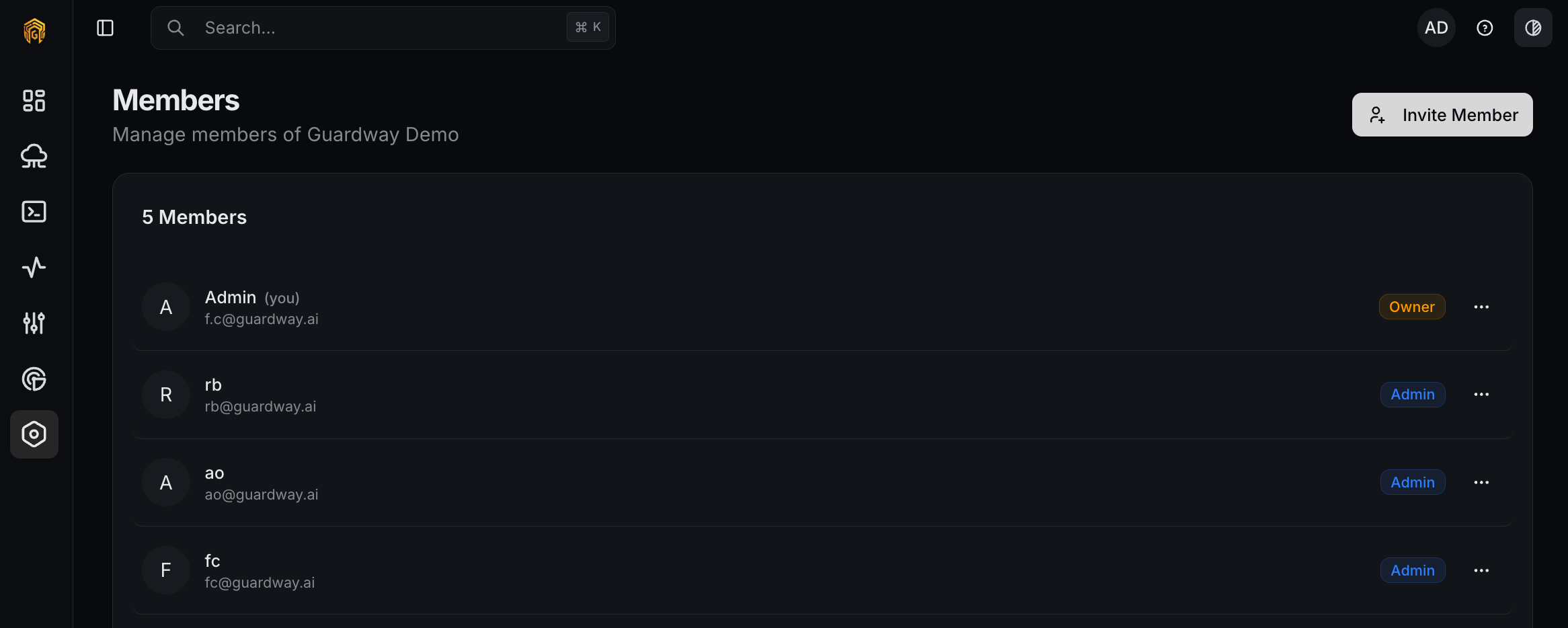 Open **Settings → Users** from the dashboard sidebar.
Click **Invite Member**, enter the email, pick a role, and click **Send Invitation**. The invitee receives an email with a sign-up link.
Open the `…` menu on the member's row. Use **Reset Password** to send a reset email, or **Remove Member** to revoke access immediately.
In **Pending Invitations**, click the trash icon on a row. The invitee's link stops working immediately and you can re-invite the same email later.
## Permissions
* **Owner** — invite, change roles, remove anyone except themselves and other owners.
* **Admin** — same as Owner except cannot remove an Owner.
* **Read Only** — can view this page but cannot invite, change roles, or remove members.
See [Roles](/platform/settings/roles) for the full permission matrix.
## Related
* [Roles](/platform/settings/roles) — what each role can do across the dashboard.
* [Configuration → Access](/platform/configuration/members) — gateway-scoped users and teams used for budgets and quotas.
* [Audit Log](/platform/settings/audit-log) — every member change is recorded here.
Open **Settings → Users** from the dashboard sidebar.
Click **Invite Member**, enter the email, pick a role, and click **Send Invitation**. The invitee receives an email with a sign-up link.
Open the `…` menu on the member's row. Use **Reset Password** to send a reset email, or **Remove Member** to revoke access immediately.
In **Pending Invitations**, click the trash icon on a row. The invitee's link stops working immediately and you can re-invite the same email later.
## Permissions
* **Owner** — invite, change roles, remove anyone except themselves and other owners.
* **Admin** — same as Owner except cannot remove an Owner.
* **Read Only** — can view this page but cannot invite, change roles, or remove members.
See [Roles](/platform/settings/roles) for the full permission matrix.
## Related
* [Roles](/platform/settings/roles) — what each role can do across the dashboard.
* [Configuration → Access](/platform/configuration/members) — gateway-scoped users and teams used for budgets and quotas.
* [Audit Log](/platform/settings/audit-log) — every member change is recorded here.