> ## Documentation Index
> Fetch the complete documentation index at: https://docs.guardway.ai/llms.txt
> Use this file to discover all available pages before exploring further.
# Audit Log
> Filter and inspect administrative actions recorded by your gateway.
## What this is for
The **Audit Log** is a tamper-evident record of every administrative action across your organization — config changes, key rotations, user invites, provider edits, failed auth, role changes, and so on. Use it to investigate incidents, satisfy compliance reviews, and verify that an action you took (or that someone reported) actually happened.
Audit logs live on the **Guardway platform**, not on individual gateways. Every administrative action — whether it touched the org, a gateway, or a configuration entity — is recorded centrally so you have one consolidated trail for the whole organization.
## Options
### Columns
| Column | Notes |
| ---------- | ------------------------------------------------------------------------------------- |
| **Log ID** | Unique event identifier. |
| **When** | Timestamp (supports seconds, milliseconds, and ISO). |
| **Who** | Actor email or user ID. |
| **Action** | Color-coded badge: delete (red), update (yellow), create / auth (blue), read (green). |
| **Target** | Resource type acted upon. |
| **Role** | Actor's role at the time of the event. |
| **Origin** | Source IP. |
Columns are sortable and resizable.
### Filters
* **Free-text search** — debounced, matches any field, server-side.
* **Who** — actor dropdown.
* **Action** — `All Actions`, `Read`, `Create`, `Update`, `Delete`.
* **Target** — resource type.
* **Time range** — `All Time`, `Last Hour`, `24h`, `7d`, `30d`, or a custom calendar.
* **Refresh** — manual refetch.
### Event categories
Actions are bucketed by the verb in the event name:
| Bucket | Matches |
| ---------- | ------------------------------------------------------------------- |
| **Delete** | delete, revoke, remove, suspend, block, deny, reject. |
| **Update** | update, edit, modify, change, rotate, reset. |
| **Create** | create, write, add, invite, register, enable, login, auth, connect. |
| **Read** | read, list, get, view, fetch, query, success. |
### Row actions
* **Expand** — pretty-printed JSON with every field broken out.
* **Raw / Details toggle** — switch between structured view and raw payload.
* **Copy event** — copies the full JSON to the clipboard.
## How to configure
There is no configuration on this page — the audit log is read-only and recorded automatically by the platform. To filter or investigate:
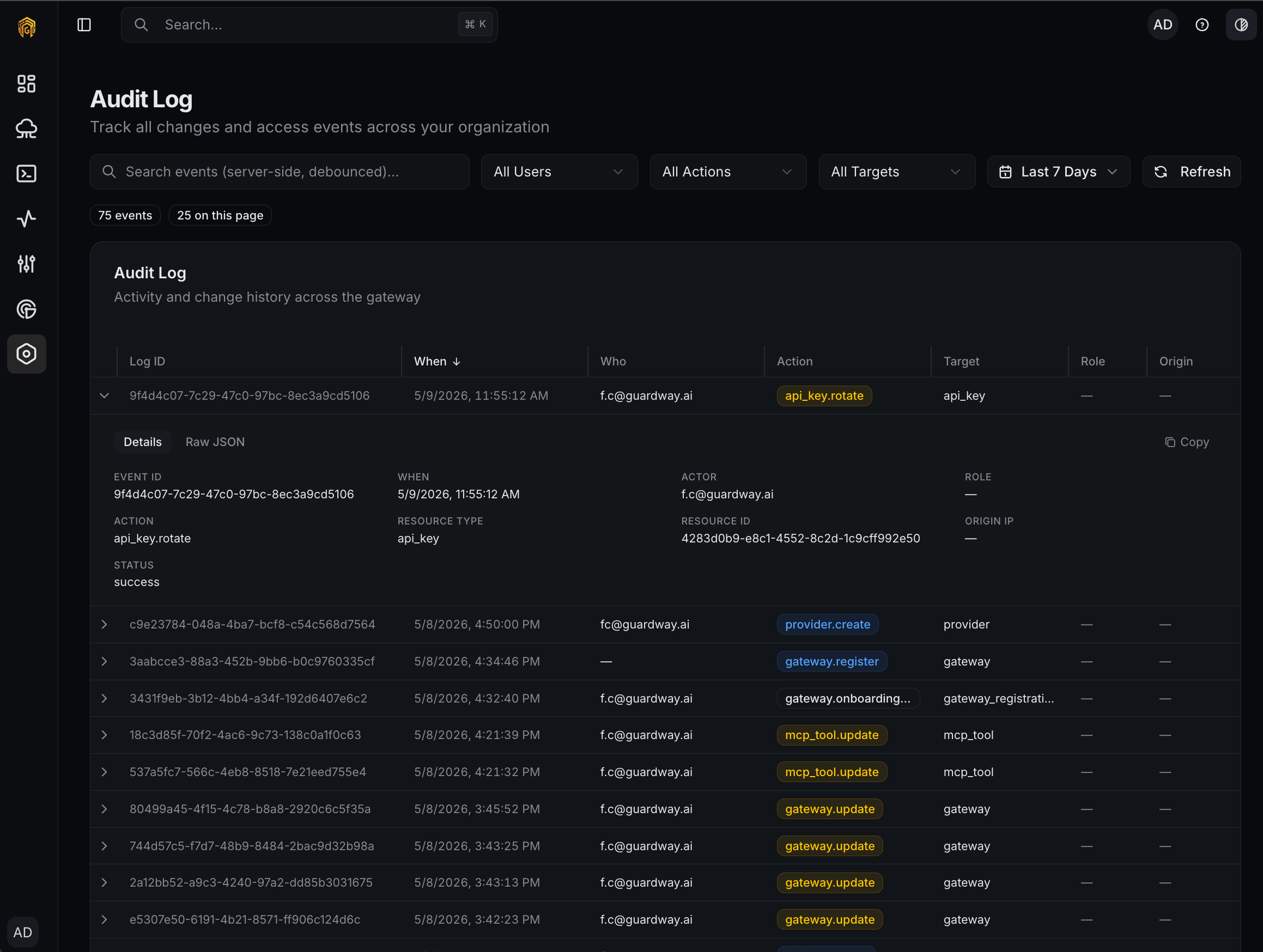 Open **Settings → Audit Log** from the dashboard sidebar. The most recent events appear at the top.
Pick a preset (`Last Hour`, `24h`, `7d`, `30d`) or open the custom calendar to pin a specific window.
Use **Who** to focus on a single user, or **Action** to pull only delete / update / create / read events.
Click a row to expand it. Use **Raw / Details** to flip between structured fields and the raw JSON; **Copy event** copies the full payload for pasting into a ticket.
There is no export from this view today. Bulk extraction via API is on the roadmap.
## Permissions
Any signed-in member of the organization can read the audit log. Role-based restrictions on the audit log itself are not applied in the UI; the action badge shows the actor's role at the time of each event for attribution.
## Related
* [Logs](/platform/logs) — request, MCP, guardrail, and trace logs (operational, not administrative).
* [Privacy & Security](/resources/privacy-and-security) — how audit data is stored and protected on the platform.
Open **Settings → Audit Log** from the dashboard sidebar. The most recent events appear at the top.
Pick a preset (`Last Hour`, `24h`, `7d`, `30d`) or open the custom calendar to pin a specific window.
Use **Who** to focus on a single user, or **Action** to pull only delete / update / create / read events.
Click a row to expand it. Use **Raw / Details** to flip between structured fields and the raw JSON; **Copy event** copies the full payload for pasting into a ticket.
There is no export from this view today. Bulk extraction via API is on the roadmap.
## Permissions
Any signed-in member of the organization can read the audit log. Role-based restrictions on the audit log itself are not applied in the UI; the action badge shows the actor's role at the time of each event for attribution.
## Related
* [Logs](/platform/logs) — request, MCP, guardrail, and trace logs (operational, not administrative).
* [Privacy & Security](/resources/privacy-and-security) — how audit data is stored and protected on the platform.