> ## Documentation Index
> Fetch the complete documentation index at: https://docs.guardway.ai/llms.txt
> Use this file to discover all available pages before exploring further.
# Playground
> Send test requests through your gateway, tune parameters, and inspect the raw request and response.
## What this is for
**Playground** is an in-dashboard chat UI that sends real requests through your activated gateway. Use it to smoke-test a provider after connecting it, debug guardrails, validate routing rules, or compare models side-by-side without writing any client code.
Every playground request flows through the gateway exactly like a production call, so it's also the fastest way to verify a change to providers, models, routing, or guardrails.
**Playground requests originate from the Guardway platform, not your browser.** A **Healthy** pill in the dashboard only proves the gateway can reach the Guardway control plane outbound — it does **not** prove the platform can reach the gateway inbound. For Playground to work, the gateway must be **published and reachable over the internet** at the URL you connected (a public hostname / port, a tunnel, or a reverse proxy with TLS). A gateway running only on a private LAN will register and heartbeat fine, but every Playground request will fail to connect.
## Options
| Control | What it does |
| ----------------- | -------------------------------------------------------------- |
| **Provider** | Filters the model list to one provider. |
| **Model** | Any enabled chat model from the selected provider and gateway. |
| **System prompt** | Optional textarea. Sets the system message. |
| **Temperature** | `0`–`2`. Default `1`. Lower is more deterministic. |
| **Max tokens** | Upper bound on completion length. |
| **Top-P** | Nucleus sampling. |
| **Streaming** | Toggle. When on, tokens arrive incrementally. |
The right rail surfaces **Request JSON** and **Response JSON** tabs so you can copy the exact payload into your own client.
## Requirements
* At least one **Healthy** gateway — see [Activate](/guardway-gateway/activate).
* At least one provider attached to that gateway with valid credentials — see [Providers](/platform/configuration/providers).
* At least one enabled model — see [Models](/platform/configuration/models).
If any of these is missing, the Playground shows an inline empty state with a link to the page that fixes it.
## How to configure
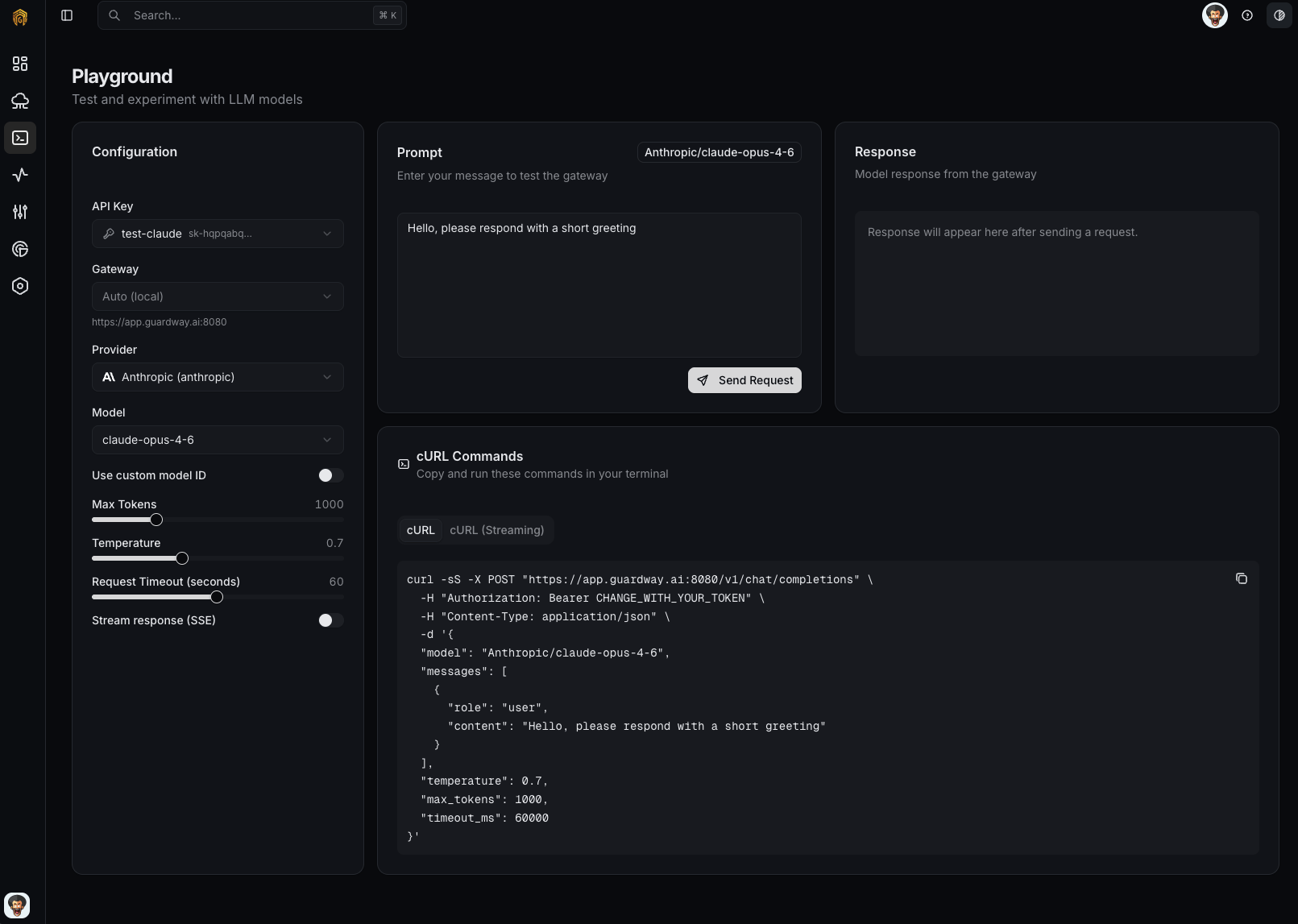 Open **Playground** from the dashboard sidebar.
Use the **Provider** dropdown to filter, then pick an enabled **Model**.
Adjust **Temperature**, **Max tokens**, and **Top-P** as needed. Toggle **Streaming** on to see tokens arrive incrementally.
Type into the chat box and press **Send**. The response renders in the chat pane and the **Request / Response JSON** tabs populate on the right.
Open [Logs](/platform/logs) — the request appears with its trace ID, latency, and cost. Click the trace to see every step the gateway took.
## Tips
Enable a PII rule under [Configuration → Security](/platform/configuration/security#guardrails), then paste a prompt containing a fake SSN into the Playground. The gateway should block or redact it depending on the rule's action — and the trigger will show in the **Guardrails** tab of [Logs](/platform/logs).
Open Playground in two tabs, pick different models, send the same prompt. The Traces view in [Logs](/platform/logs) lets you compare latency and cost after the fact.
The **Request JSON** tab shows the exact payload sent to the gateway, so you can drop it into your own client unchanged.
## Related
* [Logs](/platform/logs) — every Playground request is logged and traced.
* [Configuration → Routing](/platform/configuration/routing) — rules that decide which provider serves a Playground request.
Open **Playground** from the dashboard sidebar.
Use the **Provider** dropdown to filter, then pick an enabled **Model**.
Adjust **Temperature**, **Max tokens**, and **Top-P** as needed. Toggle **Streaming** on to see tokens arrive incrementally.
Type into the chat box and press **Send**. The response renders in the chat pane and the **Request / Response JSON** tabs populate on the right.
Open [Logs](/platform/logs) — the request appears with its trace ID, latency, and cost. Click the trace to see every step the gateway took.
## Tips
Enable a PII rule under [Configuration → Security](/platform/configuration/security#guardrails), then paste a prompt containing a fake SSN into the Playground. The gateway should block or redact it depending on the rule's action — and the trigger will show in the **Guardrails** tab of [Logs](/platform/logs).
Open Playground in two tabs, pick different models, send the same prompt. The Traces view in [Logs](/platform/logs) lets you compare latency and cost after the fact.
The **Request JSON** tab shows the exact payload sent to the gateway, so you can drop it into your own client unchanged.
## Related
* [Logs](/platform/logs) — every Playground request is logged and traced.
* [Configuration → Routing](/platform/configuration/routing) — rules that decide which provider serves a Playground request.