> ## Documentation Index
> Fetch the complete documentation index at: https://docs.guardway.ai/llms.txt
> Use this file to discover all available pages before exploring further.
# Routing
> Routing strategies and rules that decide which provider handles each request.
## What this is for
The gateway picks a target provider for each incoming request using **routing rules**. Each rule has match conditions, a target, an optional fallback, and a routing **strategy** that decides what "best" means when more than one provider could serve the request.
Manage rules from **Configuration → Routing**. Rules are evaluated by priority; the first matching rule wins.
## Options
### Strategies
| Strategy | Behavior |
| ------------------ | ---------------------------------------------------------- |
| **Priority** | First available wins. Default. |
| **Lowest Latency** | Routes to the provider with the lowest historical p50. |
| **Lowest Cost** | Routes to the cheapest provider for the requested model. |
| **Least Busy** | Routes to the provider with the fewest in-flight requests. |
### Match Conditions
Each condition is a `field` + `operator` + `value` triple. Multiple conditions on a rule are AND-ed.
| Field | Operators | Notes |
| ------------- | -------------------------------------------- | --------------------------------------------- |
| **Endpoint** | `equals`, `contains`, `starts with`, `regex` | Matches the request path. |
| **Header** | `equals`, `contains`, `starts with`, `regex` | Matches a specific request header. |
| **Model** | `equals`, `contains`, `starts with`, `regex` | Matches the model id requested by the client. |
| **API Key** | `equals`, `contains`, `starts with`, `regex` | Matches the API key id (not the secret). |
| **Source IP** | `equals`, `contains`, `starts with`, `regex` | Matches the client IP. |
### Target and Fallback
* **Target** — pick a provider, then a specific model from that provider's enabled inventory or a free-text model name.
* **Fallback (optional)** — same shape as Target. Used when the primary target fails or is unavailable.
### Other rule fields
* **Rule Name** — display label (e.g. *Production Chat*).
* **Priority** — lower number runs first.
* **Enabled** — toggle a rule off without deleting it.
## How to configure
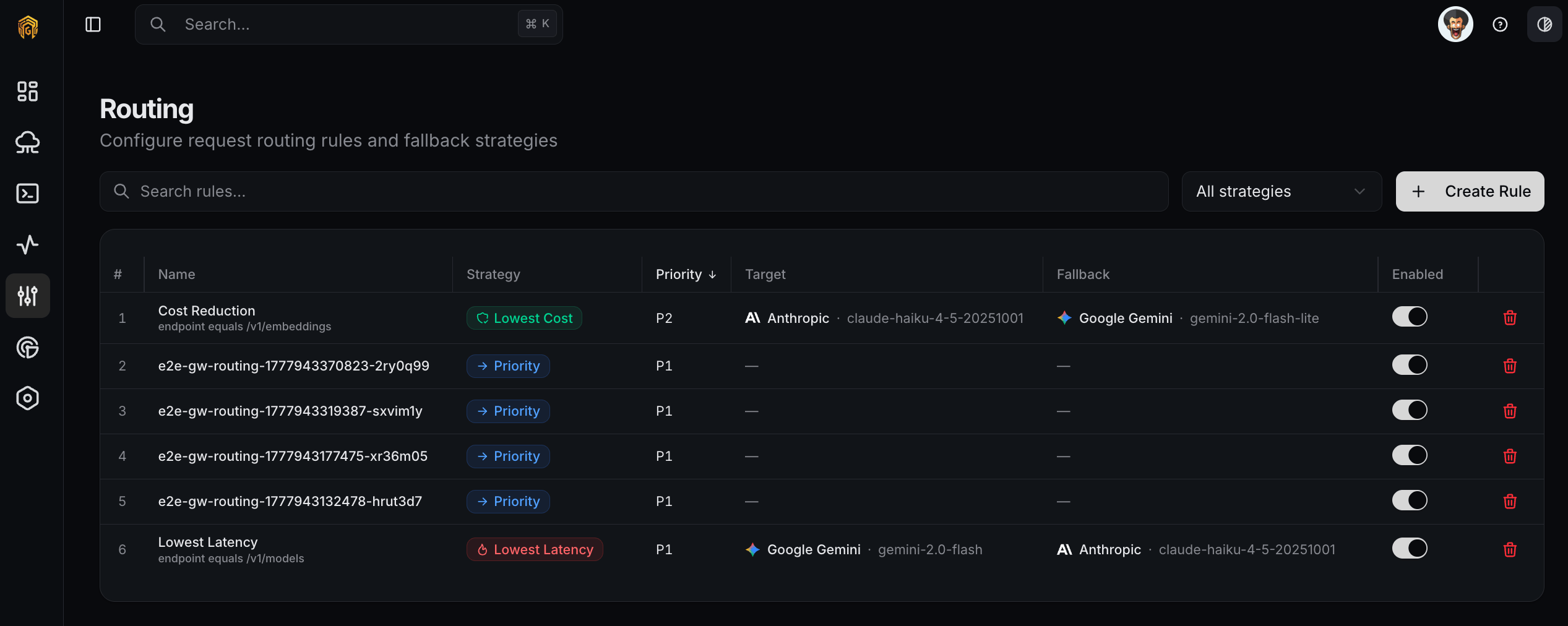 Open **Configuration → Routing** from the dashboard sidebar and click **Create Routing Rule**.
Set a **Rule Name** and pick a **Strategy**. Set a **Priority**; lower numbers evaluate first.
Open **Configuration → Routing** from the dashboard sidebar and click **Create Routing Rule**.
Set a **Rule Name** and pick a **Strategy**. Set a **Priority**; lower numbers evaluate first.
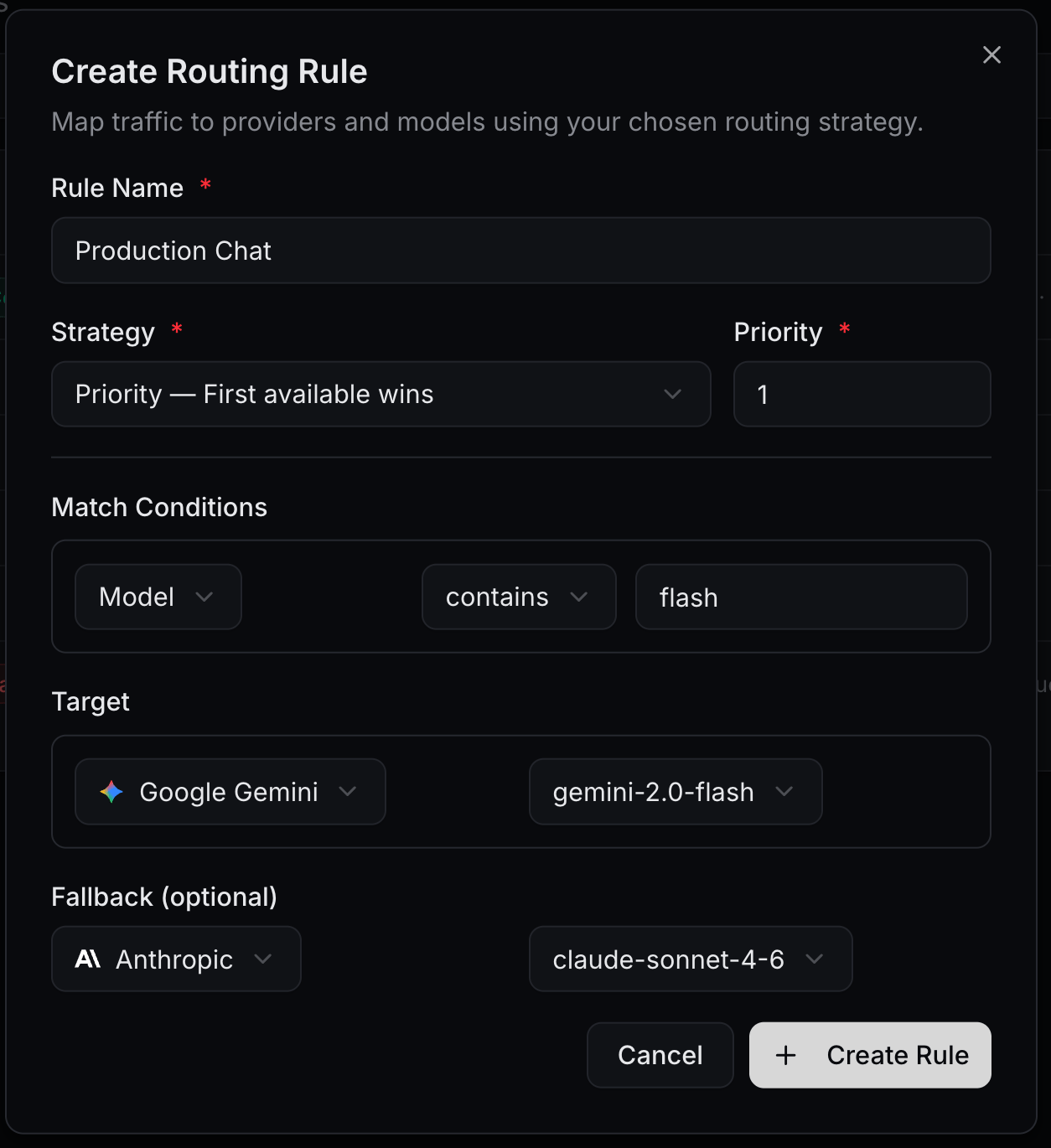 Add one or more conditions. For example, `Model contains flash` to capture every Gemini Flash variant.
Pick a **Provider**, then either select a model from its enabled inventory or enter a model name. Optionally set a **Fallback** provider/model for when the primary fails.
Click **Create Rule**. The rule appears in the list. Send a request that matches the rule's conditions and confirm the gateway routed it to the expected provider in [Logs](/platform/logs).
## Example
Send every Gemini Flash request to Google Gemini, falling back to Anthropic if Gemini is unavailable:
| Field | Value |
| --------------- | ---------------------------------- |
| Rule Name | `Production Chat` |
| Strategy | `Priority — First available wins` |
| Priority | `1` |
| Match Condition | `Model contains flash` |
| Target | `Google Gemini / gemini-2.0-flash` |
| Fallback | `Anthropic / claude-sonnet-4-6` |
## Related
* [Models](/platform/configuration/models) — the model inventory each rule targets.
* [Providers](/platform/configuration/providers) — provider list and health.
* [Logs](/platform/logs) — verify which rule matched a given request.
Add one or more conditions. For example, `Model contains flash` to capture every Gemini Flash variant.
Pick a **Provider**, then either select a model from its enabled inventory or enter a model name. Optionally set a **Fallback** provider/model for when the primary fails.
Click **Create Rule**. The rule appears in the list. Send a request that matches the rule's conditions and confirm the gateway routed it to the expected provider in [Logs](/platform/logs).
## Example
Send every Gemini Flash request to Google Gemini, falling back to Anthropic if Gemini is unavailable:
| Field | Value |
| --------------- | ---------------------------------- |
| Rule Name | `Production Chat` |
| Strategy | `Priority — First available wins` |
| Priority | `1` |
| Match Condition | `Model contains flash` |
| Target | `Google Gemini / gemini-2.0-flash` |
| Fallback | `Anthropic / claude-sonnet-4-6` |
## Related
* [Models](/platform/configuration/models) — the model inventory each rule targets.
* [Providers](/platform/configuration/providers) — provider list and health.
* [Logs](/platform/logs) — verify which rule matched a given request.