> ## Documentation Index
> Fetch the complete documentation index at: https://docs.guardway.ai/llms.txt
> Use this file to discover all available pages before exploring further.
# Providers
> Add an LLM provider to Guardway, pick a preset, paste an API key, and attach it to a gateway.
## What this is for
Providers are the upstream LLM services your gateway routes to (OpenAI, Anthropic, AWS Bedrock, Azure OpenAI, your own self-hosted vLLM, etc.). Each provider is **scoped to a single gateway** — that gateway holds its credentials and forwards requests to it. You can move a provider to a different gateway later from the provider edit dialog.
Use this page to add a provider to a gateway and check that the gateway can reach it.
## Options
### Provider presets
Guardway ships presets for the most common providers. Each preset pre-fills the base URL, request adapter, and any provider-specific quirks.
export const Provider = ({slug, name, ext = 'svg'}) =>
{name}
;
{``}
Custom (OpenAI-compatible)
Anything that speaks an OpenAI-compatible API works with the **Custom** preset — point it at any base URL (a self-hosted vLLM, a partner endpoint, etc.).
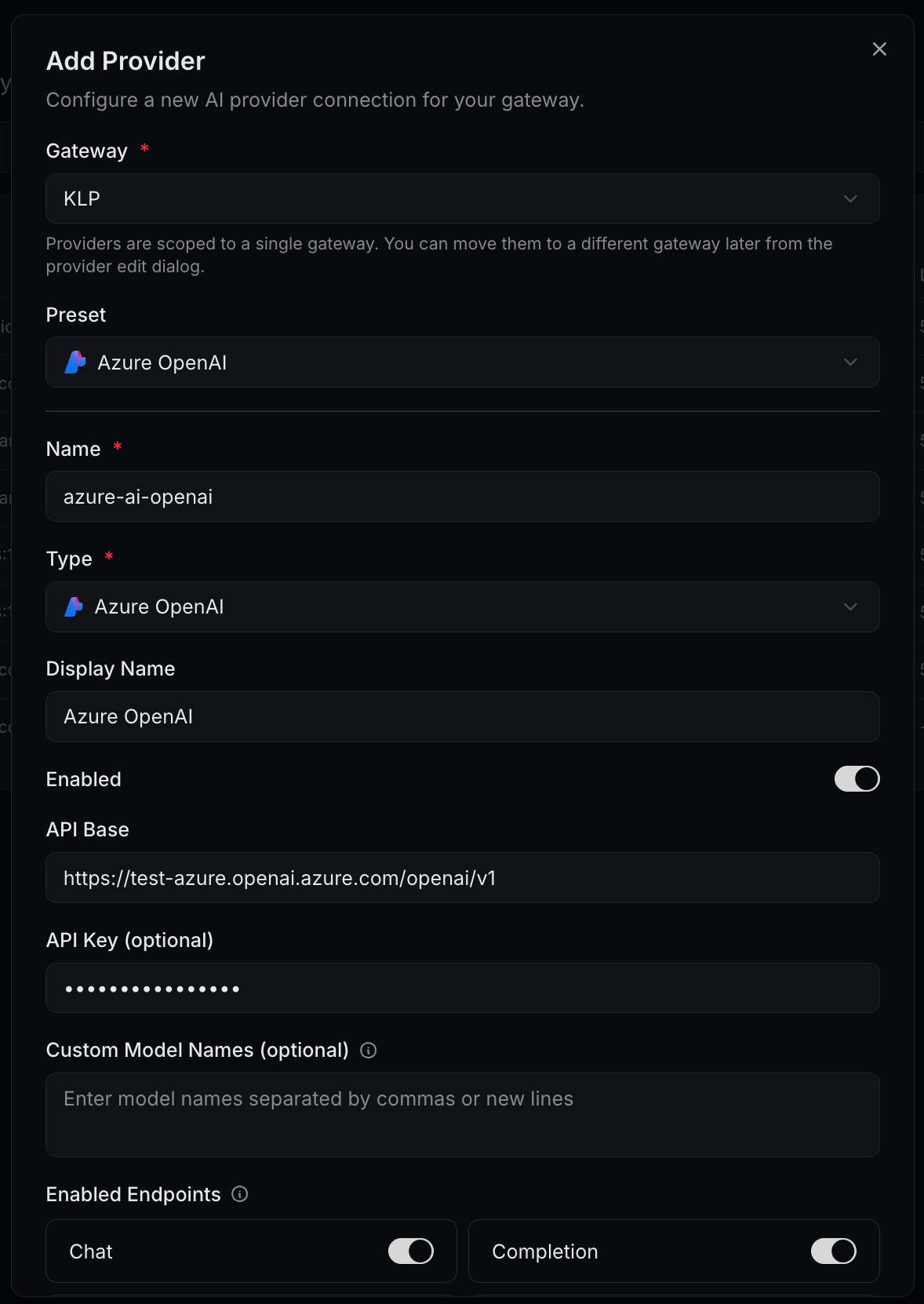
### Add Provider dialog
| Field | Required | Notes |
| ---------------------- | -------- | -------------------------------------------------------------------------------------------------------------------------------------------------------------- |
| **Gateway** | Yes | The gateway this provider belongs to. Each provider is scoped to exactly one gateway; move it later from the provider edit dialog. |
| **Preset** | No | Pick one to pre-fill **Type**, **API Base**, and any provider-specific quirks. Leave empty if you'll configure manually. |
| **Name** | Yes | Internal identifier shown in routing rules and logs. |
| **Type** | Yes | Adapter to use. Defaults to **OpenAI**. Set automatically when you pick a preset. |
| **Display Name** | No | Friendly label shown in dashboards. Falls back to **Name** when empty. |
| **Enabled** | — | Toggle. Disable to stop routing to this provider without deleting it. |
| **API Base** | Usually | Base URL of the upstream endpoint (e.g. `https://api.example.com/v1`). Pre-filled by presets; editable for Custom and for regional endpoints (Azure, Bedrock). |
| **API Key** | Usually | The provider's secret. Encrypted at rest and pushed only to the attached gateway. Optional for local presets (Ollama, LM Studio). |
| **Custom Model Names** | No | Comma-separated or newline-separated list of model identifiers to expose. Useful when a provider doesn't return a discoverable model list. |
#### Enabled Endpoints
Toggle which OpenAI-compatible endpoints this provider serves. Defaults: **Chat**, **Completion**, **Embeddings** on; **Audio**, **Images**, **Moderation** off. Disable any your account doesn't pay for so routing rules skip it cleanly.
#### Advanced Settings
| Field | Default | Notes |
| ------------------------- | -------- | ------------------------------------------------------------------------------------------------------------------ |
| **Requests/min** | `1000` | Per-provider request rate limit enforced by the gateway. |
| **Tokens/min** | `100000` | Per-provider token rate limit. |
| **Max Retries** | `3` | How many times to retry a failed upstream call before giving up. |
| **Delay (ms)** | `1000` | Initial backoff between retries. |
| **Request Timeout (ms)** | `30000` | Hard timeout on the upstream call. |
| **Custom Headers (JSON)** | empty | Extra headers sent on every request, e.g. `{"X-Custom-Header": "value"}`. |
| **Config (JSON)** | empty | Provider-specific defaults merged into requests, e.g. `{"temperature": 0.7, "max_tokens": 1000}`. |
| **Health Check URL** | empty | Optional URL the gateway pings to determine provider health. Falls back to a lightweight upstream call when empty. |
### Provider row state
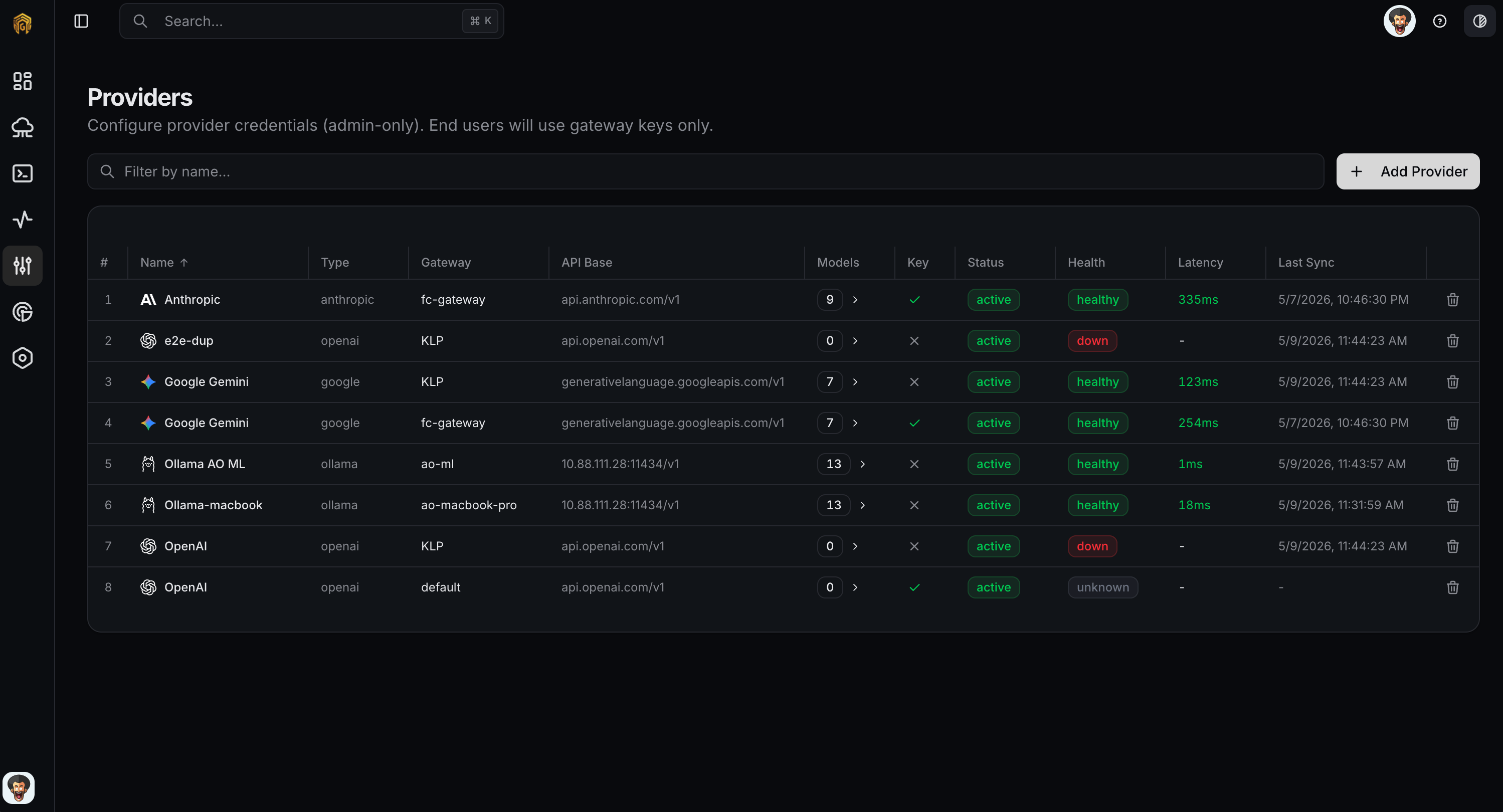
Each row in the providers list shows:
* **Health** — `healthy`, `degraded`, `down`, or `unknown`.
* **Latency** — rolling p50 to the provider.
* **Models** — count discovered (zero until you sync; see [Models](/platform/configuration/models)).
* **Enabled** — toggle to stop routing to this provider without deleting it.
## How to configure
Open **Configuration → Providers** from the dashboard sidebar and click **Add Provider**.
Select the **Gateway** this provider belongs to, then pick a **Preset** (or leave empty for a manual setup). The preset pre-fills **Type** and **API Base**.
Enter a **Name**, optionally a **Display Name**, paste the **API Key**, and override the **API Base** if your environment needs a regional or self-hosted URL. Add **Custom Model Names** when the provider can't auto-discover its model list.
Under **Enabled Endpoints**, leave on only the modalities your account supports — **Chat**, **Completion**, **Embeddings**, **Audio**, **Images**, **Moderation**.
Expand **Advanced Settings** to set per-provider **Rate Limits**, **Retry Configuration**, **Request Timeout**, **Custom Headers (JSON)**, **Config (JSON)** defaults, and a **Health Check URL**.
Click **Save Provider**. The row appears in the list with health **Unknown** until the gateway runs its first health check; it then flips to **healthy** (or surfaces an error). If it stays **unknown** for more than a minute, check the gateway can reach the provider's API Base from its network.
## Related
* [Models](/platform/configuration/models) — discover and enable specific models from a provider.
* [API Keys](/platform/configuration/api-keys) — restrict which providers a key can call.
* [Routing](/platform/configuration/routing) — fan out across providers for fallback or cost.