> ## Documentation Index
> Fetch the complete documentation index at: https://docs.guardway.ai/llms.txt
> Use this file to discover all available pages before exploring further.
# Models
> Discover the models each provider exposes per gateway and enable the ones you want to use.
## What this is for
Guardway keeps a **per-gateway model inventory**. Providers are scoped to a single gateway, so each `(gateway, provider)` pair tracks its own model list — useful when the same upstream service is configured on multiple gateways with different regions, entitlements, or local builds.
Use **Configuration → Models** to discover what each provider currently exposes on a given gateway and to toggle individual models on or off for routing and the playground.
## Options
### Sync behavior
* **Manual sync** — click **Sync Models** on a `(gateway, provider)` row. The gateway calls the provider's model-listing endpoint (or uses a static catalog for providers that don't expose one), parses the result, and reports the inventory back to the dashboard.
* **Automatic sync** — runs on gateway heartbeat. Manual sync is mostly for "I just rotated the key, pick up the new models now".
### Columns
| Column | Meaning |
| ------------------------ | ------------------------------------------------------------------- |
| **Name** | Provider's model id (e.g. `gpt-4o-mini`, `claude-sonnet-4-5`). |
| **Gateway** | Which gateway this inventory row belongs to. |
| **Provider** | Display name of the provider. |
| **Type** | `chat`, `completion`, `embedding`, `image`, or `audio`. |
| **Context** | Max context window reported by the provider. |
| **Input / Output price** | Per-million-token pricing if known, otherwise blank. |
| **Requests / Latency** | Rolling stats for this model on this gateway. |
| **Enabled** | Toggle. Disabled models are hidden from routing and the Playground. |
## How to configure
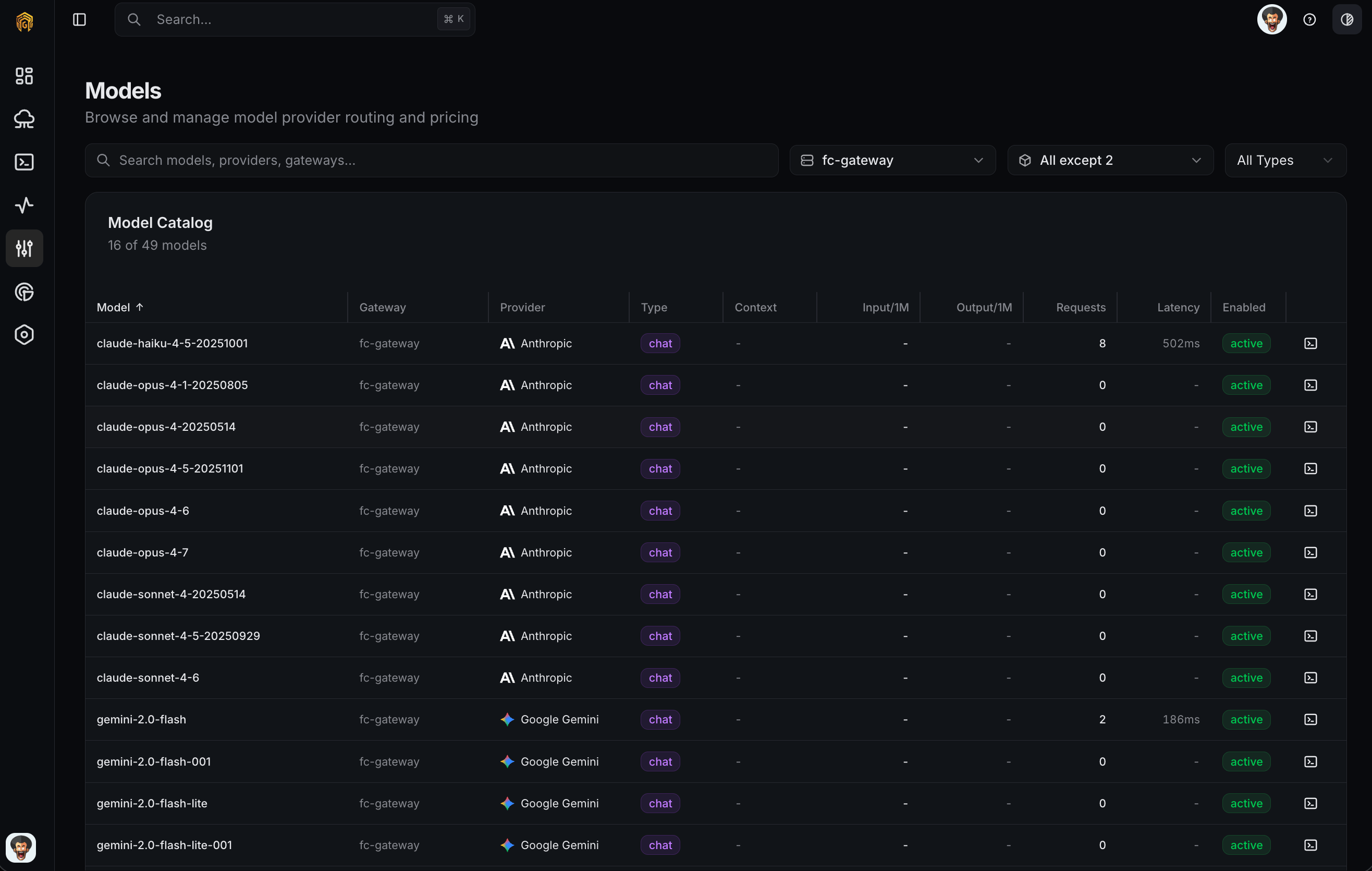 Open **Configuration → Models** from the dashboard sidebar. Each row groups by `(gateway, provider)`.
Click **Sync Models** on the row(s) you want to refresh. Wait for the toast confirmation; the inventory populates within a few seconds.
Use the **Enabled** toggle on each model. Disabled models still appear in the table but are blocked at routing time and filtered out of the Playground.
Disable models you don't want applications to use even if the provider exposes them. This is the cleanest way to keep cost-heavy or unsupported models out of production traffic.
Open [Playground](/platform/playground) and confirm the enabled models are selectable. Send a test request to confirm the gateway can route to the model.
## Related
* [Providers](/platform/configuration/providers) — attach the provider before models can be synced.
* [Routing](/platform/configuration/routing) — choose how requests fan out across enabled models.
* [Playground](/platform/playground) — test an enabled model end-to-end.
Open **Configuration → Models** from the dashboard sidebar. Each row groups by `(gateway, provider)`.
Click **Sync Models** on the row(s) you want to refresh. Wait for the toast confirmation; the inventory populates within a few seconds.
Use the **Enabled** toggle on each model. Disabled models still appear in the table but are blocked at routing time and filtered out of the Playground.
Disable models you don't want applications to use even if the provider exposes them. This is the cleanest way to keep cost-heavy or unsupported models out of production traffic.
Open [Playground](/platform/playground) and confirm the enabled models are selectable. Send a test request to confirm the gateway can route to the model.
## Related
* [Providers](/platform/configuration/providers) — attach the provider before models can be synced.
* [Routing](/platform/configuration/routing) — choose how requests fan out across enabled models.
* [Playground](/platform/playground) — test an enabled model end-to-end.