> ## Documentation Index
> Fetch the complete documentation index at: https://docs.guardway.ai/llms.txt
> Use this file to discover all available pages before exploring further.
# Overview
> The Guardway agent (gw-cli). Inventory and risk-score every AI tool, agent, skill, MCP server, and extension installed on a laptop or workstation — locally, with nothing uploaded.
**Guardway agent** (`gw-cli`) is the program behind [Endpoint AI Risk](/endpoint-ai-risk/overview). Where the GitHub side of Discovery scans your *repositories* in the cloud, `gw-cli` runs on a *machine* — a developer laptop, a build host, a workstation — and inventories the AI tools that are actually installed there: the agents, accounts, agent projects, skills, MCP servers, and extensions a person has on disk, each scored for risk.
It is a single self-contained binary. It runs entirely on the machine and stores its results encrypted under `~/.guardway`. By default it is **local-only** — nothing leaves the endpoint. Optionally, you can **enroll** it with a console API key so it reports its inventory to a central Guardway console for fleet visibility; reporting is strictly opt-in (see [Fleet reporting](#fleet-reporting-optional)).
 ## What this is for
Repository Discovery answers *"what AI does our source code depend on?"* The Guardway CLI answers the complementary question: *"what AI tooling is actually installed and running on this endpoint, and is any of it risky?"*
Use it to:
* **Inventory** the AI tools, agent projects, skills, MCP servers, and extensions on a machine.
* **Risk-score** each skill / command / subagent / MCP config before it can do harm.
* **Measure** the machine against the [OWASP Agentic Skills Top 10](/endpoint-ai-risk/agent/inventory#owasp-agentic-skills-top-10) — every finding is tagged AST01–AST10 and rolled up into a compliance score.
* **Govern** what's installed: [`approve`](/endpoint-ai-risk/agent/cli-reference#approve) a reviewed baseline, then get flagged when anything new or changed appears.
* **Vet** a skill or repo from a git URL *before* installing it — clone-and-scan, never execute.
* **Watch** live LLM traffic (model, redacted prompt, tool calls, tokens, destination) on macOS.
It complements repository Discovery: repos tell you what your codebase ships; the endpoint tells you what your engineers are running locally — including things that never touch a repo.
## What it finds
| Type | Examples |
| - | - |
| **AI tools / apps** | Claude Code, Claude Desktop, Cursor, Codex, Gemini CLI, Copilot, Cline, Continue, Goose, and many more — desktop apps, CLIs, and editor extensions. |
| **Accounts** | Per tool, whether the signed-in account is **corporate** or **personal**, from the tool's own sign-in ([how each tool is read](/endpoint-ai-risk/agent/inventory#signed-in-accounts)). |
| **Agent projects** | Folders on disk that contain agent configuration (skills, MCP configs, add-ons). |
| **Skills** | `SKILL.md` skills, risk-scored individually. |
| **MCP servers** | Registered [MCP](https://modelcontextprotocol.io) server configs, analyzed for hardcoded secrets, non-TLS endpoints, and shell-launch. |
| **Commands / Hooks / Subagents / Plugins** | The full agent extension surface, with risky items flagged. |
## Platforms
| OS | Build | Install |
| - | - | - |
| **macOS** 13+ | Universal (Apple Silicon and Intel). Full feature set, including the managed relay. | [.pkg](/endpoint-ai-risk/connect/macos) |
| **Windows** 10 and 11 | x86\_64. Enforce points tools straight at your gateway; only fail closed applies. | [.msi](/endpoint-ai-risk/connect/windows) |
| **Linux** | x86\_64 and arm64, glibc 2.34+. Ubuntu 22.04+, Debian 12+, RHEL/Rocky/Alma 9, Fedora. | [.deb / .rpm](/endpoint-ai-risk/connect/linux) |
## Install
For any machine you manage, install the package for its operating system and enroll it from the
console. That path is documented under [Connect Endpoint](/endpoint-ai-risk/connect/overview):
[macOS .pkg](/endpoint-ai-risk/connect/macos), [Windows .msi](/endpoint-ai-risk/connect/windows),
[Linux .deb / .rpm](/endpoint-ai-risk/connect/linux), then [Activate](/endpoint-ai-risk/connect/activate).
### Evaluation install
To try the agent on your own laptop without a package, every release also ships an archive with a
per-user installer. It installs into your home folder, starts for your user only, and can record
but never block.
```sh theme={null}
tar -xzf guardway-gw-cli-macos-arm64.tar.gz # or -macos-x86_64
cd guardway-gw-cli
./install.sh
```
Copies `gw-cli` to `~/.local/bin`. If `gw-cli: command not found`, add `~/.local/bin` to your `PATH`.
```sh theme={null}
tar -xzf guardway-gw-cli-linux-x86_64.tar.gz # or -linux-arm64
cd guardway-gw-cli
./install.sh
```
Copies `gw-cli` to `~/.local/bin`.
Unzip `guardway-gw-cli-windows-x86_64.zip`, then in **PowerShell** from the unzipped folder:
```powershell theme={null}
powershell -ExecutionPolicy Bypass -File .\install.ps1
```
Open a **new** terminal so the updated `PATH` takes effect. SmartScreen may warn on first run.
The archive installers set the agent to start at sign-in for your user and wire Claude Code's
telemetry export in your own settings. Remove it all with `gw-cli uninstall`.
## How it works
```sh theme={null}
gw-cli discover --deep
```
Walks the machine for AI tools, agent projects, skills, MCP configs, and extensions, then risk-scores each artifact and stores the result encrypted under `~/.guardway`.
```sh theme={null}
gw-cli serve # live dashboard → http://localhost:8789 (Ctrl-C to stop)
gw-cli report # or a plain-text summary in the terminal
```
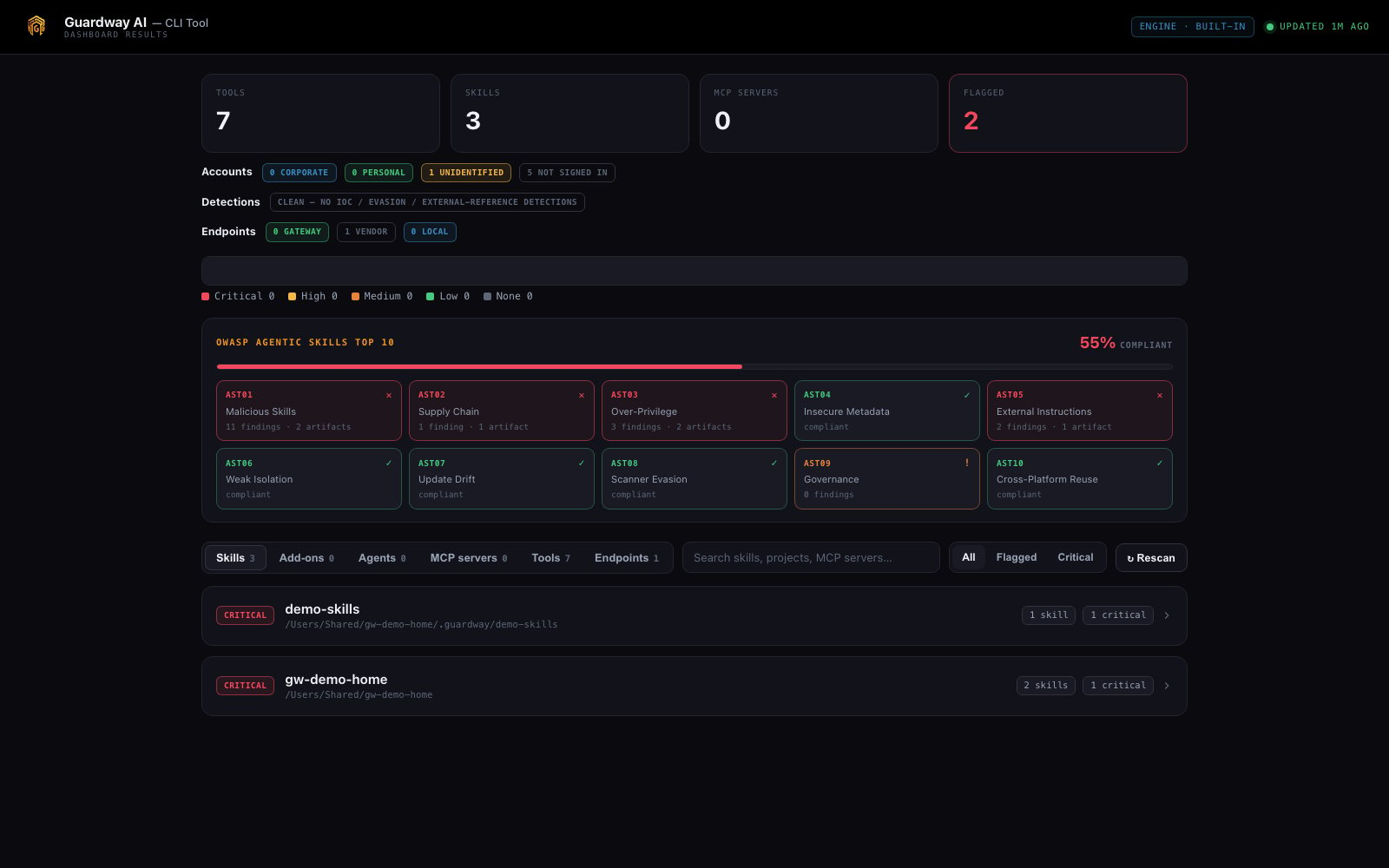
The dashboard groups skills by project, badges each by risk, and has tabs for Add-ons, Agents, MCP servers, Tools, and Runtime — plus an Accounts summary. See [Local Dashboard](/endpoint-ai-risk/agent/dashboard).
```sh theme={null}
gw-cli schedule --interval daily --at 09:00
```
Installs a background job (launchd / systemd `--user` timer / Task Scheduler) that re-runs `discover --deep` on a cadence and exits — nothing stays resident. Open `serve` whenever you want to look.
```sh theme={null}
gw-cli vet github.com/owner/repo
```
Shallow-clones a skill/repo into a throwaway temp dir, scans every artifact, prints a verdict, and deletes the clone — **the code is never executed**.
```sh theme={null}
gw-cli mitm
```
Trusts a local CA and points the system HTTPS proxy at a local inspector so you can see what your AI tools actually send to model providers — with secrets redacted. Reverts on exit.
## Accurate risk scoring (recommended)
Out of the box, `gw-cli` scores with a built-in heuristic engine. For production-grade precision, install **NVIDIA SkillSpector** with one guided command — it discloses what it is and what leaves the machine, asks before installing, and pins to a reviewed commit:
```sh theme={null}
gw-cli setup # install SkillSpector (guided, pinned)
gw-cli doctor # confirm: engine, SkillSpector / Python / uv status, air-gap & LLM modes
gw-cli discover --deep # now scores with engine = Built-in + SkillSpector
```
Once installed, scans report engine **Built-in + SkillSpector** — the always-on built-in pass plus SkillSpector's precision scoring — and SkillSpector works without a provider key thanks to a smart LLM default. Reviewed a finding and decided it's expected? [`gw-cli accept`](/endpoint-ai-risk/agent/cli-reference#accept) marks it trusted so it stops counting against OWASP compliance.
See [Inventory & Risk Scoring](/endpoint-ai-risk/agent/inventory) for how the two engines differ and what the offline augmentation passes add on top.
## Fleet reporting (optional)
Until it is enrolled, the CLI does not contact Guardway. Skill scans still look up package vulnerabilities on `api.osv.dev` unless you pass `--air-gap`. The hosts an enrolled agent uses are on [Network Requirements](/getting-started/network-requirements#endpoint-agent). To roll endpoint inventory up into a central console for fleet visibility, **enroll** the machine once with an endpoint API key:
```sh theme={null}
gw-cli enroll --key sk-ep-… --url --verify
```
This writes the key + console URL to `/config.toml` (mode `0600`, never logged). Afterwards you can push the current snapshot on demand or after a scan:
```sh theme={null}
gw-cli discover --deep --report # scan, then push the findings
gw-cli report --push # push the latest stored snapshot
gw-cli enroll --remove # stop reporting; clears the saved config
```
Reporting is **opt-in and fail-safe**: nothing is sent unless a key + URL are configured, secrets are already redacted at source, `--air-gap` disables reporting, and a failed push is queued to a local outbox and retried on the next run — it never breaks a scan.
## Scope & privacy
The Guardway CLI is **local-first**. It runs on the machine and stores everything encrypted under `~/.guardway` (`%USERPROFILE%\.guardway` on Windows). Unless you explicitly [enroll](#fleet-reporting-optional) it with a console API key, **nothing leaves the endpoint** — no inventory, no findings, no prompts. Wipe all state with `rm -rf ~/.guardway`.
Only one `gw-cli` process can use the encrypted store at a time. Don't run `discover` while `serve` is running — use the dashboard's **Rescan** button instead.
## Where to next
Every command and flag: `discover`, `serve`, `scan`, `vet`, `report`, `schedule`, `mitm`, `demo`.
What it detects, the risk levels, the two scoring engines, and the offline evasion-resistant passes.
The `serve` dashboard: tabs, the Accounts summary, freshness, and auto-refresh.
The repository (GitHub) side of Discovery that this complements.
This documentation is built and hosted on [Mintlify](https://mintlify.com), a developer documentation platform.
## What this is for
Repository Discovery answers *"what AI does our source code depend on?"* The Guardway CLI answers the complementary question: *"what AI tooling is actually installed and running on this endpoint, and is any of it risky?"*
Use it to:
* **Inventory** the AI tools, agent projects, skills, MCP servers, and extensions on a machine.
* **Risk-score** each skill / command / subagent / MCP config before it can do harm.
* **Measure** the machine against the [OWASP Agentic Skills Top 10](/endpoint-ai-risk/agent/inventory#owasp-agentic-skills-top-10) — every finding is tagged AST01–AST10 and rolled up into a compliance score.
* **Govern** what's installed: [`approve`](/endpoint-ai-risk/agent/cli-reference#approve) a reviewed baseline, then get flagged when anything new or changed appears.
* **Vet** a skill or repo from a git URL *before* installing it — clone-and-scan, never execute.
* **Watch** live LLM traffic (model, redacted prompt, tool calls, tokens, destination) on macOS.
It complements repository Discovery: repos tell you what your codebase ships; the endpoint tells you what your engineers are running locally — including things that never touch a repo.
## What it finds
| Type | Examples |
| - | - |
| **AI tools / apps** | Claude Code, Claude Desktop, Cursor, Codex, Gemini CLI, Copilot, Cline, Continue, Goose, and many more — desktop apps, CLIs, and editor extensions. |
| **Accounts** | Per tool, whether the signed-in account is **corporate** or **personal**, from the tool's own sign-in ([how each tool is read](/endpoint-ai-risk/agent/inventory#signed-in-accounts)). |
| **Agent projects** | Folders on disk that contain agent configuration (skills, MCP configs, add-ons). |
| **Skills** | `SKILL.md` skills, risk-scored individually. |
| **MCP servers** | Registered [MCP](https://modelcontextprotocol.io) server configs, analyzed for hardcoded secrets, non-TLS endpoints, and shell-launch. |
| **Commands / Hooks / Subagents / Plugins** | The full agent extension surface, with risky items flagged. |
## Platforms
| OS | Build | Install |
| - | - | - |
| **macOS** 13+ | Universal (Apple Silicon and Intel). Full feature set, including the managed relay. | [.pkg](/endpoint-ai-risk/connect/macos) |
| **Windows** 10 and 11 | x86\_64. Enforce points tools straight at your gateway; only fail closed applies. | [.msi](/endpoint-ai-risk/connect/windows) |
| **Linux** | x86\_64 and arm64, glibc 2.34+. Ubuntu 22.04+, Debian 12+, RHEL/Rocky/Alma 9, Fedora. | [.deb / .rpm](/endpoint-ai-risk/connect/linux) |
## Install
For any machine you manage, install the package for its operating system and enroll it from the
console. That path is documented under [Connect Endpoint](/endpoint-ai-risk/connect/overview):
[macOS .pkg](/endpoint-ai-risk/connect/macos), [Windows .msi](/endpoint-ai-risk/connect/windows),
[Linux .deb / .rpm](/endpoint-ai-risk/connect/linux), then [Activate](/endpoint-ai-risk/connect/activate).
### Evaluation install
To try the agent on your own laptop without a package, every release also ships an archive with a
per-user installer. It installs into your home folder, starts for your user only, and can record
but never block.
```sh theme={null}
tar -xzf guardway-gw-cli-macos-arm64.tar.gz # or -macos-x86_64
cd guardway-gw-cli
./install.sh
```
Copies `gw-cli` to `~/.local/bin`. If `gw-cli: command not found`, add `~/.local/bin` to your `PATH`.
```sh theme={null}
tar -xzf guardway-gw-cli-linux-x86_64.tar.gz # or -linux-arm64
cd guardway-gw-cli
./install.sh
```
Copies `gw-cli` to `~/.local/bin`.
Unzip `guardway-gw-cli-windows-x86_64.zip`, then in **PowerShell** from the unzipped folder:
```powershell theme={null}
powershell -ExecutionPolicy Bypass -File .\install.ps1
```
Open a **new** terminal so the updated `PATH` takes effect. SmartScreen may warn on first run.
The archive installers set the agent to start at sign-in for your user and wire Claude Code's
telemetry export in your own settings. Remove it all with `gw-cli uninstall`.
## How it works
```sh theme={null}
gw-cli discover --deep
```
Walks the machine for AI tools, agent projects, skills, MCP configs, and extensions, then risk-scores each artifact and stores the result encrypted under `~/.guardway`.
```sh theme={null}
gw-cli serve # live dashboard → http://localhost:8789 (Ctrl-C to stop)
gw-cli report # or a plain-text summary in the terminal
```
The dashboard groups skills by project, badges each by risk, and has tabs for Add-ons, Agents, MCP servers, Tools, and Runtime — plus an Accounts summary. See [Local Dashboard](/endpoint-ai-risk/agent/dashboard).
```sh theme={null}
gw-cli schedule --interval daily --at 09:00
```
Installs a background job (launchd / systemd `--user` timer / Task Scheduler) that re-runs `discover --deep` on a cadence and exits — nothing stays resident. Open `serve` whenever you want to look.
```sh theme={null}
gw-cli vet github.com/owner/repo
```
Shallow-clones a skill/repo into a throwaway temp dir, scans every artifact, prints a verdict, and deletes the clone — **the code is never executed**.
```sh theme={null}
gw-cli mitm
```
Trusts a local CA and points the system HTTPS proxy at a local inspector so you can see what your AI tools actually send to model providers — with secrets redacted. Reverts on exit.
## Accurate risk scoring (recommended)
Out of the box, `gw-cli` scores with a built-in heuristic engine. For production-grade precision, install **NVIDIA SkillSpector** with one guided command — it discloses what it is and what leaves the machine, asks before installing, and pins to a reviewed commit:
```sh theme={null}
gw-cli setup # install SkillSpector (guided, pinned)
gw-cli doctor # confirm: engine, SkillSpector / Python / uv status, air-gap & LLM modes
gw-cli discover --deep # now scores with engine = Built-in + SkillSpector
```
Once installed, scans report engine **Built-in + SkillSpector** — the always-on built-in pass plus SkillSpector's precision scoring — and SkillSpector works without a provider key thanks to a smart LLM default. Reviewed a finding and decided it's expected? [`gw-cli accept`](/endpoint-ai-risk/agent/cli-reference#accept) marks it trusted so it stops counting against OWASP compliance.
See [Inventory & Risk Scoring](/endpoint-ai-risk/agent/inventory) for how the two engines differ and what the offline augmentation passes add on top.
## Fleet reporting (optional)
Until it is enrolled, the CLI does not contact Guardway. Skill scans still look up package vulnerabilities on `api.osv.dev` unless you pass `--air-gap`. The hosts an enrolled agent uses are on [Network Requirements](/getting-started/network-requirements#endpoint-agent). To roll endpoint inventory up into a central console for fleet visibility, **enroll** the machine once with an endpoint API key:
```sh theme={null}
gw-cli enroll --key sk-ep-… --url --verify
```
This writes the key + console URL to `/config.toml` (mode `0600`, never logged). Afterwards you can push the current snapshot on demand or after a scan:
```sh theme={null}
gw-cli discover --deep --report # scan, then push the findings
gw-cli report --push # push the latest stored snapshot
gw-cli enroll --remove # stop reporting; clears the saved config
```
Reporting is **opt-in and fail-safe**: nothing is sent unless a key + URL are configured, secrets are already redacted at source, `--air-gap` disables reporting, and a failed push is queued to a local outbox and retried on the next run — it never breaks a scan.
## Scope & privacy
The Guardway CLI is **local-first**. It runs on the machine and stores everything encrypted under `~/.guardway` (`%USERPROFILE%\.guardway` on Windows). Unless you explicitly [enroll](#fleet-reporting-optional) it with a console API key, **nothing leaves the endpoint** — no inventory, no findings, no prompts. Wipe all state with `rm -rf ~/.guardway`.
Only one `gw-cli` process can use the encrypted store at a time. Don't run `discover` while `serve` is running — use the dashboard's **Rescan** button instead.
## Where to next
Every command and flag: `discover`, `serve`, `scan`, `vet`, `report`, `schedule`, `mitm`, `demo`.
What it detects, the risk levels, the two scoring engines, and the offline evasion-resistant passes.
The `serve` dashboard: tabs, the Accounts summary, freshness, and auto-refresh.
The repository (GitHub) side of Discovery that this complements.
This documentation is built and hosted on [Mintlify](https://mintlify.com), a developer documentation platform.