> ## Documentation Index
> Fetch the complete documentation index at: https://docs.guardway.ai/llms.txt
> Use this file to discover all available pages before exploring further.
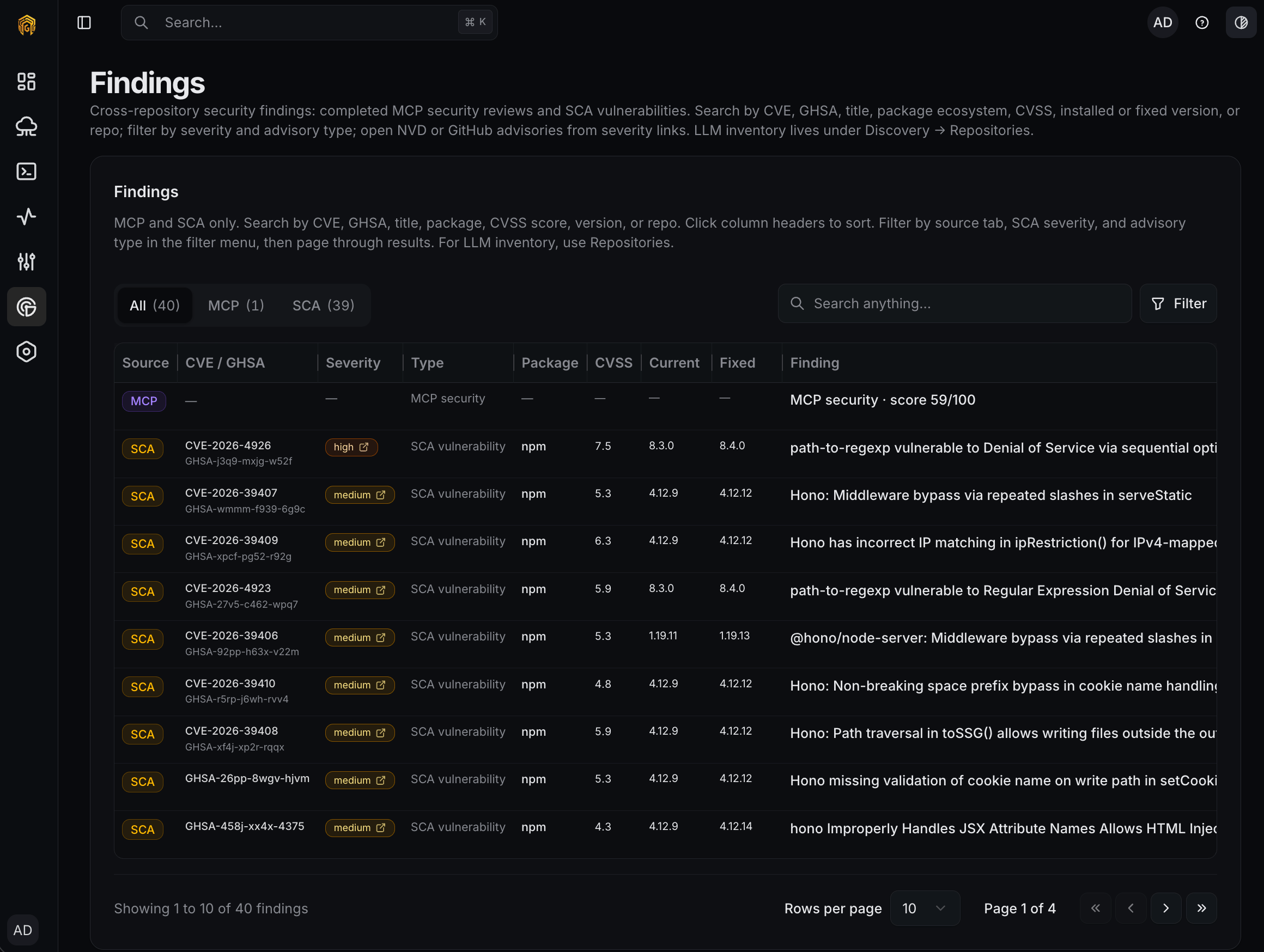
# Findings
> Drill into a scanned repository, browse AI dependencies by type, review MCP security scores and SCA vulnerabilities.
Open any repository from **Discovery → Organizations → \{org} → Repositories** to land on its detail page.
 ## Page header
Top of the page shows:
* **Scan status badge** — `Never Scanned`, `Scanning`, `Completed`, `Failed`.
* **Last scanned** timestamp, if any.
* **Scan** button — retriggers analysis. Shows a spinner and polls every 3 seconds while scanning. Toast: *"Scan started — this may take a moment."*
* **Export AIBOM** — disabled until a scan completes.
## AI dependencies
A tabbed table, each tab showing one finding type with a count:
| Tab | What it contains |
| ----------------- | ------------------------------------------------------------------------------------------ |
| **LLM Providers** | Direct imports or calls to OpenAI, Anthropic, Google, etc. |
| **AI Services** | External AI services (moderation APIs, speech, image gen). |
| **SDKs** | AI-related packages declared in `package.json`, `requirements.txt`, `pyproject.toml`, etc. |
| **MCPs** | Registered MCP servers and tool configurations. |
| **Gateways** | Guardway and other AI-gateway configuration files. |
Columns vary per tab but typically include **Name / Provider**, **Type**, **File path**, and **Version**. Tables are sortable; a search box at the top filters across all tabs.
## Security scans
Shown below the dependency tabs if the scan included security analysis.
### MCP Security
* **Overall score** — 0 to 100, colored red (low) → yellow → green (high).
* **Risk level** badge.
* **Category scores** — Code Security, Supply Chain, Maintenance, Community, MCP Security.
* **Executive summary** — short AI-generated prose describing notable findings.
### SCA Vulnerabilities
* Total vulnerability count.
* Scrollable list, each entry badged **critical** / **high** / **medium** / **low** / **info** with a title and description.
## Export AIBOM
Click **Export AIBOM** to download `aibom-{repoName}-{YYYY-MM-DD}.cdx.json` — a [CycloneDX 1.6](https://cyclonedx.org/specification/overview/) bill of materials covering every finding on the repository. Feed it to your SBOM tooling, supply-chain checks, or compliance pipeline.
Org-level bulk AIBOM export is tracked as a future feature. Today you export per-repo.
## Page header
Top of the page shows:
* **Scan status badge** — `Never Scanned`, `Scanning`, `Completed`, `Failed`.
* **Last scanned** timestamp, if any.
* **Scan** button — retriggers analysis. Shows a spinner and polls every 3 seconds while scanning. Toast: *"Scan started — this may take a moment."*
* **Export AIBOM** — disabled until a scan completes.
## AI dependencies
A tabbed table, each tab showing one finding type with a count:
| Tab | What it contains |
| ----------------- | ------------------------------------------------------------------------------------------ |
| **LLM Providers** | Direct imports or calls to OpenAI, Anthropic, Google, etc. |
| **AI Services** | External AI services (moderation APIs, speech, image gen). |
| **SDKs** | AI-related packages declared in `package.json`, `requirements.txt`, `pyproject.toml`, etc. |
| **MCPs** | Registered MCP servers and tool configurations. |
| **Gateways** | Guardway and other AI-gateway configuration files. |
Columns vary per tab but typically include **Name / Provider**, **Type**, **File path**, and **Version**. Tables are sortable; a search box at the top filters across all tabs.
## Security scans
Shown below the dependency tabs if the scan included security analysis.
### MCP Security
* **Overall score** — 0 to 100, colored red (low) → yellow → green (high).
* **Risk level** badge.
* **Category scores** — Code Security, Supply Chain, Maintenance, Community, MCP Security.
* **Executive summary** — short AI-generated prose describing notable findings.
### SCA Vulnerabilities
* Total vulnerability count.
* Scrollable list, each entry badged **critical** / **high** / **medium** / **low** / **info** with a title and description.
## Export AIBOM
Click **Export AIBOM** to download `aibom-{repoName}-{YYYY-MM-DD}.cdx.json` — a [CycloneDX 1.6](https://cyclonedx.org/specification/overview/) bill of materials covering every finding on the repository. Feed it to your SBOM tooling, supply-chain checks, or compliance pipeline.
Org-level bulk AIBOM export is tracked as a future feature. Today you export per-repo.